如iradio設定為disabled 又不想顯示灰階圖示
調整一下圖片顯示位置即可。
<style>
.iradio_flat-green.checked.disabled{
background-position: -110px 0 !important;
}
</style>
2019年7月4日 星期四

2019年6月5日 星期三
[SQL]無法截斷資料表 'xxx',因為該資料表正由 FOREIGN KEY 條件約束參考解決方式
使用truncate table 時會出現
無法截斷資料表 'xxx',因為該資料表正由 FOREIGN KEY 條件約束參考解決方式
先刪除再重建自動編號即可。
DELETE table;
DBCC CHECKIDENT('table', RESEED, 0);
無法截斷資料表 'xxx',因為該資料表正由 FOREIGN KEY 條件約束參考解決方式
先刪除再重建自動編號即可。
DELETE table;
DBCC CHECKIDENT('table', RESEED, 0);
2019年5月28日 星期二
[Juqery]動態刪除table tr
<table>
<thead>
<tr>
<th style="width: 1%">
test
</th>
</tr>
</thead>
<tbody>
<tr>
<td>
<a href="#" onclick="Delete(this)">
刪除
</a>
<a href="#" onclick="Delete(this)">
刪除
</a>
<a href="#" onclick="Delete(this)">
刪除
</a>
</td>
</tr>
</tbody>
</table>
function Delete(_this) { _this.closest('tr').remove(); }
<thead>
<tr>
<th style="width: 1%">
test
</th>
</tr>
</thead>
<tbody>
<tr>
<td>
<a href="#" onclick="Delete(this)">
刪除
</a>
<a href="#" onclick="Delete(this)">
刪除
</a>
<a href="#" onclick="Delete(this)">
刪除
</a>
</td>
</tr>
</tbody>
</table>
function Delete(_this) { _this.closest('tr').remove(); }
2019年5月27日 星期一
2019年5月24日 星期五
[SQL Server]重設自動編號
因有設定關聯使用Truncate Table會出現"無法截斷資料表 'TABLE_NAME',因為該資料表正由 FOREIGN KEY 條件約束參考。"
先將資料刪除再執行以下sql重設自動編號
DBCC CHECKIDENT ('table', RESEED, 0);
先將資料刪除再執行以下sql重設自動編號
DBCC CHECKIDENT ('table', RESEED, 0);
2019年5月10日 星期五
[Echarts] 圖表自動適應
//頁面只有一個圖表時使用
var echartGauge = echarts.init(document.getElementById('圖表ID'));
echartGauge.setOption({......})
window.onresize = echartGauge.resize;
//頁面有兩個以上的圖表時使用
window.addEventListener("resize", function () {
myChart.resize();
});
var echartGauge = echarts.init(document.getElementById('圖表ID'));
echartGauge.setOption({......})
window.onresize = echartGauge.resize;
//頁面有兩個以上的圖表時使用
window.addEventListener("resize", function () {
myChart.resize();
});
2019年5月1日 星期三
訂閱:
文章 (Atom)
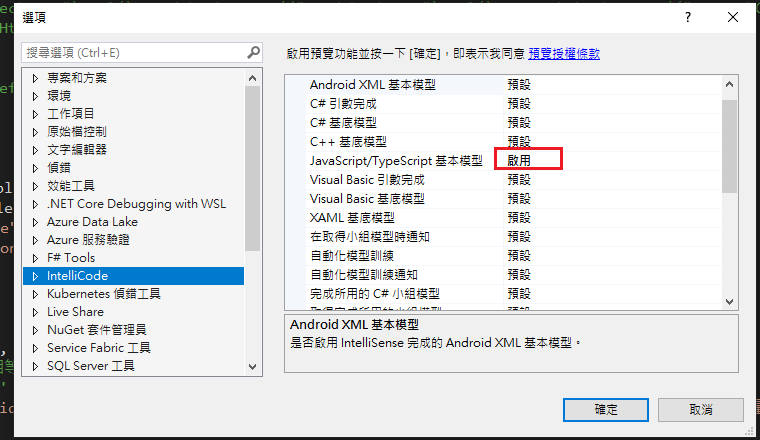
Visual Studio JS intellisense 失效解決方式
試了好久,發現到工具>選項>IntelliCode js項目設定啟用,重新開啟VS就正常了! 後來發現是TypeScript3.2版有問題停用,使用4.3版的TypeScript即可
-
開啟記事本將以下程式碼貼入存成.bat @ECHO OFF set x=%date:~0,4%%date:~5,2%%date:~8,2% CD C:\Windows\System32\winevt\Logs COPY Application.evtx D:\bak\...
-
使用truncate table 時會出現 無法截斷資料表 'xxx',因為該資料表正由 FOREIGN KEY 條件約束參考解決方式 先刪除再重建自動編號即可。 DELETE table; DBCC CHECKIDENT('table...
