今天遇到了一個以前都沒注意過的問題,搞了好久才搞定。
就是我在Action裡Return PartialView並傳回model,
頁面上放了@Html.DropDownListFor(m => m.RelationshipType, (SelectList)ViewData["RelationshipTypeName"], "==請選擇=="),就是吃不到傳回的值,
後來發現是因為ViewData["RelationshipType"]的名稱與m => m.RelationshipType 一樣就不行,
改成不一樣就行了,詳細原因晚點在研究,或有高人可以指點一下。
2018年1月2日 星期二

2017年12月19日 星期二
[MVC]section Scripts -is not a function
今天遇到一個問題就是頁面上一直出現is not a function。
已確認頁面上都有載入js,以前用vs2012都沒出現過這個問題,目前是用vs2015
後來發現在view上引用js必須使用section Scripts包起來才會正確顯示。
如果沒有用section Scripts包起來的話js出現的位置會在比較上面,因該是載入順序的問題。
@section Scripts {
<script src="~/Content/js/xxx.js"></script>
}
已確認頁面上都有載入js,以前用vs2012都沒出現過這個問題,目前是用vs2015
後來發現在view上引用js必須使用section Scripts包起來才會正確顯示。
如果沒有用section Scripts包起來的話js出現的位置會在比較上面,因該是載入順序的問題。
@section Scripts {
<script src="~/Content/js/xxx.js"></script>
}
2017年2月13日 星期一
[MVC]出現HTTP Error 401.0 - Unauthorized
使用預設樣板建立MVC5,Identity來做驗證,如Action有使用Authorize會出現
HTTP Error 401.0 - Unauthorized
如沒使用Identity,在web.config
<system.webServer>
<modules>
<remove name="FormsAuthentication" /> //將這行移除即可
</modules>
<validation validateIntegratedModeConfiguration="false" />
</system.webServer>
2015年12月10日 星期四
[MVC]View helper的用法
總是有一些需要再view裡面處理,使用helper非常的簡便,如下判斷要使用那個class。
<div class ="@test(1)">test</div>
@helper test(int i)
{
if (i > 0)
{
@("class1")}
else
{
@("class2")
}
}
<div class ="@test(1)">test</div>
@helper test(int i)
{
if (i > 0)
{
@("class1")}
else
{
@("class2")
}
}
2015年11月25日 星期三
[MVC]動態載入PartialView並傳回ViewModel
筆者設計操作界面時,習慣在同個頁面下作業,即在同個畫面上開窗。
如下圖右下角檢視按鈕按下後開啟視窗。(開窗畫面為PartialView)

如何實作?
步驟1:
在同頁面上放上<div id="Panel"></div>
步驟2:
透過AJAX取得該筆資料
function OpenSubMenu(id)
{
$.ajax({
url: '/Test/GetData/',
type: 'post',
data: { id: id },
cache: false,
async: false,
success: function (res) {
$("#Panel").html(res); //將PartialView塞入Panel
}
});
}
步驟3:
[HttpPost]
public ActionResult GetData(int id)
{
return PartialView("_PartailView", exchangeOutService.GetData(id));
}
ps:exchangeOutService.GetData(id) 這段請自行實作資料層,筆者是透過服務層叫用資料
2015年5月30日 星期六
[MVC]路由-Action取不到值
剛路由設定好Action 一直取不到townsID的值,
原來是因為預設的路由條件比較寬鬆,所以自訂的規則就不會執行了,
只要將預設路由放在自訂規則的下面即可。
routes.MapRoute(
"HotelList",
"Default/HotelList/{townsID}",
new { controller = "Default", action = "HotelList", townsID = 0 }
);
routes.MapRoute(
name: "Default",
url: "{controller}/{action}/{id}",
defaults: new { controller = "Default", action = "Index", id = UrlParameter.Optional }
);
原來是因為預設的路由條件比較寬鬆,所以自訂的規則就不會執行了,
只要將預設路由放在自訂規則的下面即可。
routes.MapRoute(
"HotelList",
"Default/HotelList/{townsID}",
new { controller = "Default", action = "HotelList", townsID = 0 }
);
routes.MapRoute(
name: "Default",
url: "{controller}/{action}/{id}",
defaults: new { controller = "Default", action = "Index", id = UrlParameter.Optional }
);
2015年3月13日 星期五
[MVC]使用T-SQL查詢資料
如使用較複雜SQL時,可使用下列方式來處理
命名空間
using System.Data;
using System.Data.SqlClient;
using (xxxEntities db = new xxxEntities())
{
string result ="";
SqlParameter[] p = new SqlParameter[1];
p[0] = new SqlParameter("@Year", year);
string sql =
@"
select count(*) Total from Table
where
ayear = @Year
";
result= db.Database.SqlQuery<int>(sql, p).FirstOrDefault();
}
db.Database.SqlQuery<int> 此Sql統計筆數故使用int型態
命名空間
using System.Data;
using System.Data.SqlClient;
using (xxxEntities db = new xxxEntities())
{
string result ="";
SqlParameter[] p = new SqlParameter[1];
p[0] = new SqlParameter("@Year", year);
string sql =
@"
select count(*) Total from Table
where
ayear = @Year
";
result= db.Database.SqlQuery<int>(sql, p).FirstOrDefault();
}
db.Database.SqlQuery<int> 此Sql統計筆數故使用int型態
捕捉實體資料模型edmx錯誤訊息
try{
}
catch (System.Data.Entity.Validation.DbEntityValidationException ex)
{
result.Message = ex.Message;
}
2014年12月15日 星期一
[MVC] DropDownListFor用法
View
@Html.DropDownListFor(m => m.Week, new SelectList((System.Collections.IEnumerable)ViewData["WeekList"], "Value", "Text"))
Controller
public ActionResult RoomOpenDateSet()
{
ViewData["WeekList"] = roomOpenSetService.GetRoomOpenSetWeeksByRoomListID(roomListID);
}
Class
public List<SelectListItem> CreatWeekDropDownList(string roomListID)
{
List<SelectListItem> items = new List<SelectListItem>();
var query = roomOpenSetService.GetRoomOpenSetWeeksByRoomListID(roomListID);
foreach (var item in query)
{
items.Add(new SelectListItem { Text = Enum.GetName(typeof(WeekList), item.Week), Value = item.Week.ToString() });
}
return items;
}
傳回html版==============================================================
[HttpPost]
public ActionResult GetWeekList(string roomListid)
{
return Json(sf.CreatWeekDropDownList(roomListid));
}
public string CreatWeekDropDownList(string roomListID)
{
List<SelectListItem> items = new List<SelectListItem>();
StringBuilder result = new StringBuilder();
int _roomListID = Convert.ToInt32(des.DESDecrypt(roomListID, "a"));
var userList = roomOpenSetService.GetRoomOpenSetWeeksByRoomListID(_roomListID);
result.Append("<select id=\"Week\" name=\"Week\">");
result.Append("<option value=\"0\">==請選擇星期==</option>");
foreach (var item in userList)
{
result.Append("<option value=\"" + item.Week + "\">" + item.Week + "</option>");
}
result.Append("</select>");
return result.ToString();
}
JS
$.ajax({
url: '/SpaceControl/GetWeekList/',
type: 'post',
data: { roomListid: roomListID },
cache: false,
async: false,
success: function (res) {
alert(res);
$("#Weeks").html(res);
},
error: function (x, e) {
window.location.href = "/Share/ErrorPage?err=500";
}
});
=======================================================================
列舉
public enum WeekList
{
一 = 1,
二 = 2,
三 = 3,
四 = 4,
五 = 5,
六 = 6,
日 = 7
}
@Html.DropDownListFor(m => m.Week, new SelectList((System.Collections.IEnumerable)ViewData["WeekList"], "Value", "Text"))
Controller
public ActionResult RoomOpenDateSet()
{
ViewData["WeekList"] = roomOpenSetService.GetRoomOpenSetWeeksByRoomListID(roomListID);
}
Class
public List<SelectListItem> CreatWeekDropDownList(string roomListID)
{
List<SelectListItem> items = new List<SelectListItem>();
var query = roomOpenSetService.GetRoomOpenSetWeeksByRoomListID(roomListID);
foreach (var item in query)
{
items.Add(new SelectListItem { Text = Enum.GetName(typeof(WeekList), item.Week), Value = item.Week.ToString() });
}
return items;
}
傳回html版==============================================================
[HttpPost]
public ActionResult GetWeekList(string roomListid)
{
return Json(sf.CreatWeekDropDownList(roomListid));
}
public string CreatWeekDropDownList(string roomListID)
{
List<SelectListItem> items = new List<SelectListItem>();
StringBuilder result = new StringBuilder();
int _roomListID = Convert.ToInt32(des.DESDecrypt(roomListID, "a"));
var userList = roomOpenSetService.GetRoomOpenSetWeeksByRoomListID(_roomListID);
result.Append("<select id=\"Week\" name=\"Week\">");
result.Append("<option value=\"0\">==請選擇星期==</option>");
foreach (var item in userList)
{
result.Append("<option value=\"" + item.Week + "\">" + item.Week + "</option>");
}
result.Append("</select>");
return result.ToString();
}
JS
$.ajax({
url: '/SpaceControl/GetWeekList/',
type: 'post',
data: { roomListid: roomListID },
cache: false,
async: false,
success: function (res) {
alert(res);
$("#Weeks").html(res);
},
error: function (x, e) {
window.location.href = "/Share/ErrorPage?err=500";
}
});
=======================================================================
列舉
public enum WeekList
{
一 = 1,
二 = 2,
三 = 3,
四 = 4,
五 = 5,
六 = 6,
日 = 7
}
2014年5月13日 星期二
如何取得目前Action/Controller/Id 名稱
for MVC3
ViewContext.Controller.ValueProvider.GetValue("action").RawValue
ViewContext.Controller.ValueProvider.GetValue("controller").RawValue
ViewContext.Controller.ValueProvider.GetValue("id").RawValue
ViewContext.Controller.ValueProvider.GetValue("action").RawValue
ViewContext.Controller.ValueProvider.GetValue("controller").RawValue
ViewContext.Controller.ValueProvider.GetValue("id").RawValue
2013年6月7日 星期五
DropDownListFor 驗證失效
mvc3 下 DropDownList驗證失效加入以下即可解決
new { data_val_required = "請輸入類別", data_val = "true" }
@Html.DropDownListFor(m => m.DepartmentID, (SelectList)ViewBag.DepartmentID, "==請選擇部門==", new { data_val_required = "*", data_val = "true" })
new { data_val_required = "請輸入類別", data_val = "true" }
@Html.DropDownListFor(m => m.DepartmentID, (SelectList)ViewBag.DepartmentID, "==請選擇部門==", new { data_val_required = "*", data_val = "true" })
2012年10月16日 星期二
2012年10月5日 星期五
DropDownListFor 顯示資料庫值
1 2 3 4 5 6 7 8 9 10 11 12 13 14 15 16 17 18 19 20 21 22 23 24 25 26 27 28 29 30 | Controller { ViewBag.SiteTypeList = SF.CreatDropDownList(7); ); } View id = "ID" 會自動對應資料庫值 @Html.DropDownListFor(m => m.SiteID, (SelectList)ViewBag.SiteTypeList, new { id = "ID" }) Model { using (AbobSysEntities db = new AbobSysEntities()) { var query = db.ProductAbnormalRecord.Where(f => f.ID == id).First(); return new PARColumn { SiteID = Convert.ToString(query.SiteID), WorkOrderNum = query.WorkOrderNum }; } } public string SiteID { get; set; } } |
2012年9月28日 星期五
將datetime2 資料類型轉換成datetime 資料類型時,產生超出範圍的值。
請先將edmx用記事本開啟 找到你的欄位並做以下修改即可
原本
<Property Name="CreatDate" Type="datetime" Nullable="false" />
更改後
<Property Name="CreatDate" Type="datetime" Nullable="false" StoreGeneratedPattern ="Computed"/>
原本
<Property Name="CreatDate" Type="datetime" Nullable="false" />
更改後
<Property Name="CreatDate" Type="datetime" Nullable="false" StoreGeneratedPattern ="Computed"/>
2012年9月18日 星期二
mvc 多筆新增
1 2 3 4 5 6 7 8 9 10 11 12 13 14 15 16 17 18 | { using(xxxEntities db = new xxxEntities()) { foreach(var item in elementItemNumList) { var newElementList = new ElementList() { ElementItemNum = item.ElementItemNum, TransferOrderID = transferOrderID }; db.ElementList.AddObject(newElementList); db.SaveChanges(); } } |
TempData 轉 List
ElementItemNumList = ((List<TransferOrderModels.TransferOrderColumn>)TempData["ElementItemNumList"]);
2012年9月17日 星期一
MVC INSERT
1 2 3 4 5 6 7 8 9 10 11 12 13 14 15 16 17 18 19 20 21 22 23 24 | Controller ]Models.TransferOrder transferOrder) { TOM.InsertTransferOrder(transferOrder); return null; } Models //欄位會自動聯繫 { using xxxEntities db = new xxxEntities()) { try { //db.AddToTransferOrder(transferOrder); db.TransferOrder.AddObject(transferOrder); db.SaveChanges(); } catch (Exception e) { throw e; } } } |
2012年9月12日 星期三
jquery 驗證在ie失效
今天使用管理NuGet套件自動更新 JS 發現在IE下驗證失效
後來手動更新JS至專案即可.......
jquery.validate version 1.8.1
The following files are hosted on the CDN:
- http://ajax.aspnetcdn.com/ajax/jquery.validate/1.8.1/jquery.validate.js
- http://ajax.aspnetcdn.com/ajax/jquery.validate/1.8.1/jquery.validate.min.js
- http://ajax.aspnetcdn.com/ajax/jquery.validate/1.8.1/jquery.validate-vsdoc.js
- http://ajax.aspnetcdn.com/ajax/jquery.validate/1.8.1/additional-methods.js
- http://ajax.aspnetcdn.com/ajax/jquery.validate/1.8.1/additional-methods.min.js
- Localization Files at http://ajax.aspnetcdn.com/ajax/jquery.validate/1.8.1/localization/messages_##.js where ## is the loc code.
無法登入資料庫
原本
<add name="xxxEntities" connectionString="metadata=res://*/Models.xxxModel.csdl|res://*/Models.xxxModel.ssdl|res://*/Models.xxxModel.msl;provider=System.Data.SqlClient;provider connection string="data source=192.168.1.208;initial catalog=xxx;integrated security=True;multipleactiveresultsets=True;App=EntityFramework"" providerName="System.Data.EntityClient" />
更改後
<add name="xxxEntities" connectionString="metadata=res://*/Models.xxxModel.csdl|res://*/Models.xxxModel.ssdl|res://*/Models.xxxModel.msl;provider=System.Data.SqlClient;provider connection string="data source=192.168.1.208;initial catalog=xxx;user id=xxx;password=xxx;multipleactiveresultsets=True;App=EntityFramework"" providerName="System.Data.EntityClient" />
2012年9月8日 星期六
MVC BeginForm 頁面使用js判斷
1 2 3 4 5 6 7 8 9 | |
訂閱:
文章 (Atom)
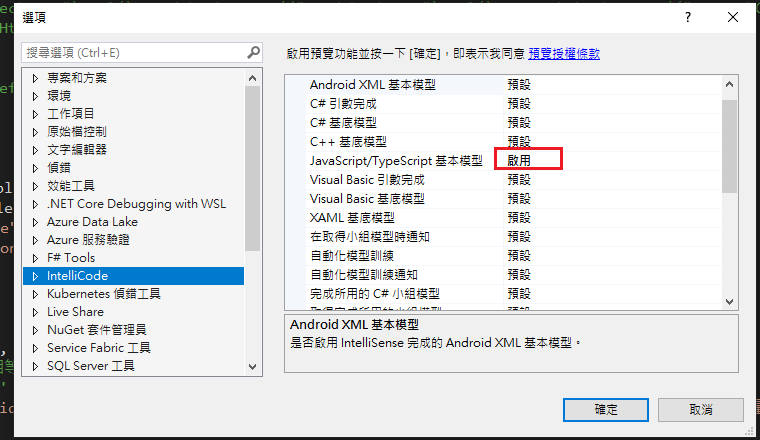
Visual Studio JS intellisense 失效解決方式
試了好久,發現到工具>選項>IntelliCode js項目設定啟用,重新開啟VS就正常了! 後來發現是TypeScript3.2版有問題停用,使用4.3版的TypeScript即可
-
開啟記事本將以下程式碼貼入存成.bat @ECHO OFF set x=%date:~0,4%%date:~5,2%%date:~8,2% CD C:\Windows\System32\winevt\Logs COPY Application.evtx D:\bak\...
-
使用truncate table 時會出現 無法截斷資料表 'xxx',因為該資料表正由 FOREIGN KEY 條件約束參考解決方式 先刪除再重建自動編號即可。 DELETE table; DBCC CHECKIDENT('table...
