顯示具有 fullCalendar 標籤的文章。 顯示所有文章

2014年5月9日 星期五

fullcalendar使用心得

一.如何在agendaWeek與agendaDay將時間顯示成 上午8點
    1.要使用的時候請設定
        header: {
                      left: 'prev,next today',
                      center: 'title',
                      right: 'month,agendaWeek,agendaDay'
                    },

     2.在fullcalendar.js 1636行 將 am/pm改成中文
         tt : function(d) { return d.getHours() < 12 ? '上午' : '下午' },

     3.再到2755行左右的 setDefaults裡面設定為以下即可顯示成 上午8點
        axisFormat: 'tth點',
        timeFormat: {
   agenda: 'tth點'
},


完成圖:

二.如何將月份某天顯示的時間點格式化為 上午8點
     請將fullcalendar.js 59行左右改成以下即可
     timeFormat: { // for event elements
   '': 'tth點'//'h(:mm)t' // default
},

2012年1月19日 星期四

可用於判斷日期小於今日的話 將不觸發dayClick事件

1
2
3
4
5
6
7
8
9
10
11
    dayClick: function(date, allDay, jsEvent, view) {

        var today=new Date();
        if(today.getHours() != 0 && today.getMinutes() != 0 &&
           today.getSeconds() != 0 && today.getMilliseconds() != 0){
            today.setHours(0,0,0,0);
        }
        if (date<today){
            alert("小於今天喔!");
        }
    }

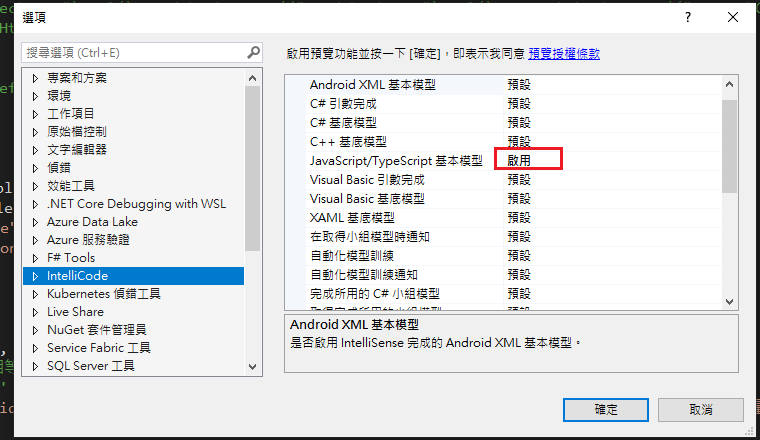
Visual Studio JS intellisense 失效解決方式

  試了好久,發現到工具>選項>IntelliCode js項目設定啟用,重新開啟VS就正常了! 後來發現是TypeScript3.2版有問題停用,使用4.3版的TypeScript即可