2018年6月5日 星期二
[SQL]找出P Key不連續編號
select beginId,
(select min(id)-1 from table where id > beginId) as endId
from (
select id+1 as beginId from table
where id+1 not in
(select id from table)
and id < (select max(id) from table)
) as t
參考資料: https://hk.saowen.com/a/3af383a9bedac1adf87c3dd66fc912d13d90555368f1ea66077c42e802f14880

2017年7月24日 星期一


2015年2月25日 星期三
[SQL Server]stored procedure 發送Email
dbmail設定完成後可在stored procedure 下以下發送mail sql
exec msdb.dbo.sp_send_dbmail
@profile_name='test', --設定檔名稱
@recipients='00@gmail.com', --收件者
@subject='test', --主旨
@body='test001', --內文
@query='你的條件式', --查詢條件
--@file_attachments='', --夾帶檔
@attach_query_result_as_file=0, -- 值為0:將@query顯示在信件內文 值為1將附加在附件內
@body_format=TEXT --設定text格式or html格式
exec msdb.dbo.sp_send_dbmail
@profile_name='test', --設定檔名稱
@recipients='00@gmail.com', --收件者
@subject='test', --主旨
@body='test001', --內文
@query='你的條件式', --查詢條件
--@file_attachments='', --夾帶檔
@attach_query_result_as_file=0, -- 值為0:將@query顯示在信件內文 值為1將附加在附件內
@body_format=TEXT --設定text格式or html格式
2014年5月7日 星期三
使用者登入失敗(管道的另一端上無任何處理程序)
已在SqlServer上建立登入使用者,但是登入時會出現使用者登入失敗(管道的另一端上無任何處理程序)等訊息。
解決方式:
再組態管理員將SQLEXPRESS的通訊協動 Shared Memory/具名管道/TCP IP狀態設為啟用就
可以登入。

解決方式:
再組態管理員將SQLEXPRESS的通訊協動 Shared Memory/具名管道/TCP IP狀態設為啟用就
可以登入。
訂閱:
文章 (Atom)
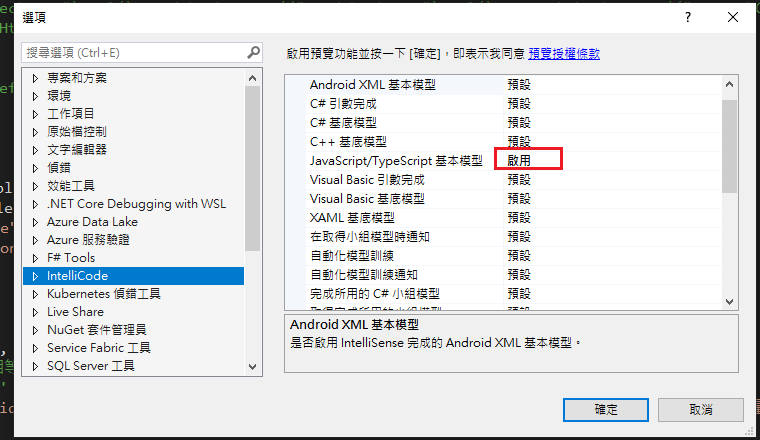
Visual Studio JS intellisense 失效解決方式
試了好久,發現到工具>選項>IntelliCode js項目設定啟用,重新開啟VS就正常了! 後來發現是TypeScript3.2版有問題停用,使用4.3版的TypeScript即可
-
開啟記事本將以下程式碼貼入存成.bat @ECHO OFF set x=%date:~0,4%%date:~5,2%%date:~8,2% CD C:\Windows\System32\winevt\Logs COPY Application.evtx D:\bak\...
-
使用truncate table 時會出現 無法截斷資料表 'xxx',因為該資料表正由 FOREIGN KEY 條件約束參考解決方式 先刪除再重建自動編號即可。 DELETE table; DBCC CHECKIDENT('table...
