目前有一大樓空間資料表
其中 A大樓其中有一間房號為111
在B大樓其中有一間房號為H111
用列表框列出房間號碼時點選B大樓竟然顯示111,H被濾掉了且讓兩筆資料連動,
進而造成點選B大樓也會顯示A大樓111這間房間,
解決方式就是在最源頭產生QVD那段也就是做ETL那加入Text轉成文字即可
LOAD
Text(RoomID)
FROM XXX
PS:我一開始是在LOAD QVD那處理結果一直都不行。
2016年12月13日 星期二

2016年11月30日 星期三
[QlikView]重新排序資料
LOAD
If(WildMatch(build_code,'大樓1','大樓2','大樓3','大樓4'),build_code) AS build_code
FROM [Build.qvd](qvd)
在物件排序頁籤設定排序依據為載入順序>原始
不管怎樣篩選條件都會照此順序排序

If(WildMatch(build_code,'大樓1','大樓2','大樓3','大樓4'),build_code) AS build_code
FROM [Build.qvd](qvd)
在物件排序頁籤設定排序依據為載入順序>原始
不管怎樣篩選條件都會照此順序排序
或是在排序>運算式
Match(Only({1} build_code),'大樓1','大樓2','大樓3','大樓4');
2016年10月31日 星期一
[C#]從MemoryStream下載檔案並壓縮成zip檔
1.在NuGet管理套件搜尋DotNetZip並安裝
2.using Ionic.Zip;
3.
using (MemoryStream memoryStream = new MemoryStream())
{
TextWriter textWriter = new StreamWriter(memoryStream);
foreach (var item in swipeS_RequestRecordSaveService.GetRequestRecordSaveList(id))
{
textWriter.WriteLine("檔案內容");
textWriter.Flush();
}
byte[] bytesInStream = memoryStream.ToArray();
memoryStream.Seek(0, SeekOrigin.Begin);
string password = desFun.Encrypt(id.ToString() + DateTime.Now.Minute.ToString());
using (ZipFile zipFile = new ZipFile())
{
zipFile.Password = password;
zipFile.AddEntry(fileName, memoryStream);
Response.ClearContent();
Response.ClearHeaders();
Response.AppendHeader("content-disposition", "attachment; filename=xxx.zip");
zipFile.Save(Response.OutputStream);
}
memoryStream.Close();
}
更多使用方式介紹 請上 https://dotnetzip.codeplex.com/
2.using Ionic.Zip;
3.
using (MemoryStream memoryStream = new MemoryStream())
{
TextWriter textWriter = new StreamWriter(memoryStream);
foreach (var item in swipeS_RequestRecordSaveService.GetRequestRecordSaveList(id))
{
textWriter.WriteLine("檔案內容");
textWriter.Flush();
}
byte[] bytesInStream = memoryStream.ToArray();
memoryStream.Seek(0, SeekOrigin.Begin);
string password = desFun.Encrypt(id.ToString() + DateTime.Now.Minute.ToString());
using (ZipFile zipFile = new ZipFile())
{
zipFile.Password = password;
zipFile.AddEntry(fileName, memoryStream);
Response.ClearContent();
Response.ClearHeaders();
Response.AppendHeader("content-disposition", "attachment; filename=xxx.zip");
zipFile.Save(Response.OutputStream);
}
memoryStream.Close();
}
更多使用方式介紹 請上 https://dotnetzip.codeplex.com/
2016年10月27日 星期四
[WebApi2]允許跨域設定方式
1.在Visual Studio 管理NuGet套件搜尋Microsoft.AspNet.WebApi.Cors並安裝
2. 在App_Start資料夾內的WebApiConfig加入config.EnableCors();
public static void Register(HttpConfiguration config)
{
config.EnableCors();
}
3.在Global.asax 加入GlobalConfiguration.Configuration.Formatters.XmlFormatter.SupportedMediaTypes.Clear();
設定只返回文字格式
protected void Application_Start()
{
GlobalConfiguration.Configuration.Formatters.XmlFormatter.SupportedMediaTypes.Clear();
}
4.在action上設定
[EnableCors(
origins: "http://localhost",//允許哪些來源網址,允許存取此web API
headers: "*", //全部
methods: "post")]
2. 在App_Start資料夾內的WebApiConfig加入config.EnableCors();
public static void Register(HttpConfiguration config)
{
config.EnableCors();
}
3.在Global.asax 加入GlobalConfiguration.Configuration.Formatters.XmlFormatter.SupportedMediaTypes.Clear();
設定只返回文字格式
protected void Application_Start()
{
GlobalConfiguration.Configuration.Formatters.XmlFormatter.SupportedMediaTypes.Clear();
}
4.在action上設定
[EnableCors(
origins: "http://localhost",//允許哪些來源網址,允許存取此web API
headers: "*", //全部
methods: "post")]
2016年10月24日 星期一
2016年9月8日 星期四
[jqGrid]百分比顯示並排序
jqGrid將數值格式化為百分比顯示,並可排序 。
colModel: [
{ name: 'Enrollment', width: 1, align: 'center', formatter: 'currency', formatoptions: { suffix: '%' }, sorttype: 'currency' }
]
colModel: [
{ name: 'Enrollment', width: 1, align: 'center', formatter: 'currency', formatoptions: { suffix: '%' }, sorttype: 'currency' }
]
[C#]Math.Round 方法
取小數點兩位數
Math.Round(99.110000,2) //99.11
其他用法詳見MSDN
https://msdn.microsoft.com/zh-tw/library/system.math.round(v=vs.110).aspx
訂閱:
文章 (Atom)
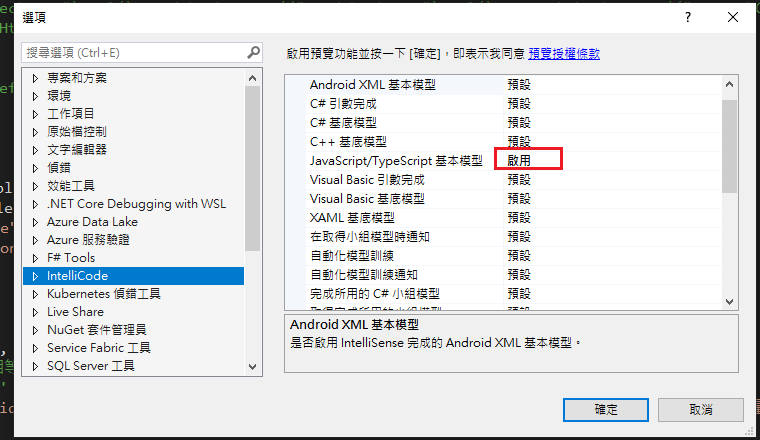
Visual Studio JS intellisense 失效解決方式
試了好久,發現到工具>選項>IntelliCode js項目設定啟用,重新開啟VS就正常了! 後來發現是TypeScript3.2版有問題停用,使用4.3版的TypeScript即可
-
開啟記事本將以下程式碼貼入存成.bat @ECHO OFF set x=%date:~0,4%%date:~5,2%%date:~8,2% CD C:\Windows\System32\winevt\Logs COPY Application.evtx D:\bak\...
-
使用truncate table 時會出現 無法截斷資料表 'xxx',因為該資料表正由 FOREIGN KEY 條件約束參考解決方式 先刪除再重建自動編號即可。 DELETE table; DBCC CHECKIDENT('table...
