1.在Visual Studio 管理NuGet套件搜尋Microsoft.AspNet.WebApi.Cors並安裝
2. 在App_Start資料夾內的WebApiConfig加入config.EnableCors();
public static void Register(HttpConfiguration config)
{
config.EnableCors();
}
3.在Global.asax 加入GlobalConfiguration.Configuration.Formatters.XmlFormatter.SupportedMediaTypes.Clear();
設定只返回文字格式
protected void Application_Start()
{
GlobalConfiguration.Configuration.Formatters.XmlFormatter.SupportedMediaTypes.Clear();
}
4.在action上設定
[EnableCors(
origins: "http://localhost",//允許哪些來源網址,允許存取此web API
headers: "*", //全部
methods: "post")]
2016年10月27日 星期四

2016年10月24日 星期一
2016年9月8日 星期四
[jqGrid]百分比顯示並排序
jqGrid將數值格式化為百分比顯示,並可排序 。
colModel: [
{ name: 'Enrollment', width: 1, align: 'center', formatter: 'currency', formatoptions: { suffix: '%' }, sorttype: 'currency' }
]
colModel: [
{ name: 'Enrollment', width: 1, align: 'center', formatter: 'currency', formatoptions: { suffix: '%' }, sorttype: 'currency' }
]
[C#]Math.Round 方法
取小數點兩位數
Math.Round(99.110000,2) //99.11
其他用法詳見MSDN
https://msdn.microsoft.com/zh-tw/library/system.math.round(v=vs.110).aspx
2016年8月26日 星期五
[bootstrap-datetimepicker]相關使用方式
1.設定預設日期
JS:
$('#divStartDate').datetimepicker({
viewMode: 'days',
format: 'YYYY/MM/DD',
defaultDate: new Date()
});
Html:
<div class="form-group">
<div class='input-group date' id='divStartDate'>
<input id="txtStartDate" name="txtStartDate" type='text' class="form-control width160px" />
<span class="input-group-addon">
<span class="glyphicon glyphicon-calendar"></span>
</span>
</div>
</div>

2.取值
$('#divStartDate').data('date');
JS:
$('#divStartDate').datetimepicker({
viewMode: 'days',
format: 'YYYY/MM/DD',
defaultDate: new Date()
});
Html:
<div class="form-group">
<div class='input-group date' id='divStartDate'>
<input id="txtStartDate" name="txtStartDate" type='text' class="form-control width160px" />
<span class="input-group-addon">
<span class="glyphicon glyphicon-calendar"></span>
</span>
</div>
</div>
2.取值
$('#divStartDate').data('date');
2016年7月13日 星期三


2016年7月5日 星期二
[Jquery Validation]使用方式
$('#form1').validate({
rules: {
tbSQty: {
required: true
},
tbRQty: {
required: true
}
},
messages: {
tbSQty: {
required: '*必填欄位'
},
tbRQty: {
required: '*必填欄位'
}
},
highlight: function (element) {
$(element).closest('.form-group').addClass('has-error');
},
unhighlight: function (element) {
$(element).closest('.form-group').removeClass('has-error');
},
errorElement: 'span',
errorClass: 'help-block',
errorPlacement: function (error, element) {
if (element.parent('.input-group').length) {
error.insertAfter(element.parent());
} else {
error.insertAfter(element);
}
}
});
rules: {
tbSQty: {
required: true
},
tbRQty: {
required: true
}
},
messages: {
tbSQty: {
required: '*必填欄位'
},
tbRQty: {
required: '*必填欄位'
}
},
highlight: function (element) {
$(element).closest('.form-group').addClass('has-error');
},
unhighlight: function (element) {
$(element).closest('.form-group').removeClass('has-error');
},
errorElement: 'span',
errorClass: 'help-block',
errorPlacement: function (error, element) {
if (element.parent('.input-group').length) {
error.insertAfter(element.parent());
} else {
error.insertAfter(element);
}
}
});
訂閱:
文章 (Atom)
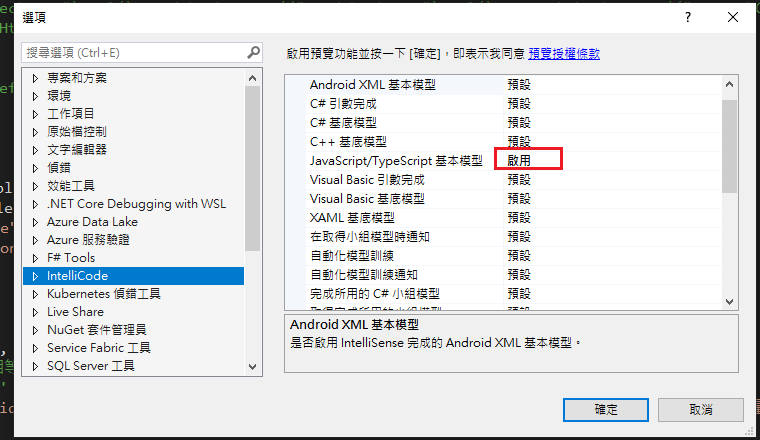
Visual Studio JS intellisense 失效解決方式
試了好久,發現到工具>選項>IntelliCode js項目設定啟用,重新開啟VS就正常了! 後來發現是TypeScript3.2版有問題停用,使用4.3版的TypeScript即可
-
開啟記事本將以下程式碼貼入存成.bat @ECHO OFF set x=%date:~0,4%%date:~5,2%%date:~8,2% CD C:\Windows\System32\winevt\Logs COPY Application.evtx D:\bak\...
-
使用truncate table 時會出現 無法截斷資料表 'xxx',因為該資料表正由 FOREIGN KEY 條件約束參考解決方式 先刪除再重建自動編號即可。 DELETE table; DBCC CHECKIDENT('table...
