dates = Fri Dec 19 2014 12:00:00 GMT+0800 (台北標準時間)
var d = new Date(dates);
var year = d.getFullYear();
var month = d.getMonth() + 1;
var day = d.getDate();
alert(year + "/" + month + "/" + day)
輸出結果: 2014/12/19
2014年12月17日 星期三

2014年12月15日 星期一
[MVC] DropDownListFor用法
View
@Html.DropDownListFor(m => m.Week, new SelectList((System.Collections.IEnumerable)ViewData["WeekList"], "Value", "Text"))
Controller
public ActionResult RoomOpenDateSet()
{
ViewData["WeekList"] = roomOpenSetService.GetRoomOpenSetWeeksByRoomListID(roomListID);
}
Class
public List<SelectListItem> CreatWeekDropDownList(string roomListID)
{
List<SelectListItem> items = new List<SelectListItem>();
var query = roomOpenSetService.GetRoomOpenSetWeeksByRoomListID(roomListID);
foreach (var item in query)
{
items.Add(new SelectListItem { Text = Enum.GetName(typeof(WeekList), item.Week), Value = item.Week.ToString() });
}
return items;
}
傳回html版==============================================================
[HttpPost]
public ActionResult GetWeekList(string roomListid)
{
return Json(sf.CreatWeekDropDownList(roomListid));
}
public string CreatWeekDropDownList(string roomListID)
{
List<SelectListItem> items = new List<SelectListItem>();
StringBuilder result = new StringBuilder();
int _roomListID = Convert.ToInt32(des.DESDecrypt(roomListID, "a"));
var userList = roomOpenSetService.GetRoomOpenSetWeeksByRoomListID(_roomListID);
result.Append("<select id=\"Week\" name=\"Week\">");
result.Append("<option value=\"0\">==請選擇星期==</option>");
foreach (var item in userList)
{
result.Append("<option value=\"" + item.Week + "\">" + item.Week + "</option>");
}
result.Append("</select>");
return result.ToString();
}
JS
$.ajax({
url: '/SpaceControl/GetWeekList/',
type: 'post',
data: { roomListid: roomListID },
cache: false,
async: false,
success: function (res) {
alert(res);
$("#Weeks").html(res);
},
error: function (x, e) {
window.location.href = "/Share/ErrorPage?err=500";
}
});
=======================================================================
列舉
public enum WeekList
{
一 = 1,
二 = 2,
三 = 3,
四 = 4,
五 = 5,
六 = 6,
日 = 7
}
2014年12月10日 星期三
DropDownListFor從資料庫讀取
暫時先記錄一下,後續再整理
View
@Html.DropDownListFor(m => m.CustomType, (SelectList)ViewBag.CustomTypeList, "==請選擇==")
Controller
ViewBag.CustomTypeList = sf.CreatMasterCodeDropDownList("CustomType");
Class
#region CreatMasterCodeDropDownList()-產生下拉選單
public SelectList CreatMasterCodeDropDownList(string columnName)
{
HotelSelectModels hsm = new HotelSelectModels();
SelectList DDLItem = new SelectList(hsm.GetMasterCodeByColumnName(columnName), "Value", "Name");
return DDLItem;
}
#endregion
Model
public List<HotelViewModel.MasterCodeModel> GetMasterCodeByColumnName(string columnName)
{
List<HotelViewModel.MasterCodeModel> result = new List<HotelViewModel.MasterCodeModel>();
using (HotelEntities db = new HotelEntities())
{
var query = db.MasterCode.Where(f => f.ColumnName == columnName).ToList();
if (query.Count > 0)
{
foreach (var item in query)
{
result.Add(new HotelViewModel.MasterCodeModel()
{
ColumnName = item.ColumnName,
Name = item.Name,
Value = item.Value
});
}
}
}
return result;
}
2014年12月4日 星期四
2014年12月1日 星期一
SQL 找出重複資料
COUNT 表示出現的次數
SELECT CalumnName,COUNT(*)FROM TableName GROUP BY CalumnName HAVING COUNT(*) > 1
SELECT CalumnName,COUNT(*)FROM TableName GROUP BY CalumnName HAVING COUNT(*) > 1
2014年11月25日 星期二
jQuery Datepicker 使用心得
重新賦予月曆 minDate/maxDate新的值
加這句即可 $('#CheckoutDate').datepick('destroy');
點選按鈕載入ReloadCheckDate


function ReloadCheckDate(checkInDate, checkOutDate) {
$('#CheckoutDate').datepick('destroy');
$('#CheckoutDate').datepick({
minDate: checkInDate,
maxDate: checkOutDate, showTrigger: '#calImg'
});
}
加這句即可 $('#CheckoutDate').datepick('destroy');
點選按鈕載入ReloadCheckDate
function ReloadCheckDate(checkInDate, checkOutDate) {
$('#CheckoutDate').datepick('destroy');
$('#CheckoutDate').datepick({
minDate: checkInDate,
maxDate: checkOutDate, showTrigger: '#calImg'
});
}
2014年11月21日 星期五
C#合併兩個Dictionary
使用Dictionary類別的擴充方法Concat串接兩個序列
Dictionary<Guid, ViewModel.EventModel> events = roomOpenService.GetRoomOpenEvents(roomListID);
events = events.Concat(roomBookingService.GetRoomBookingEvents(roomListID)).ToDictionary(k => k.Key, v => v.Value);
Dictionary<Guid, ViewModel.EventModel> events = roomOpenService.GetRoomOpenEvents(roomListID);
events = events.Concat(roomBookingService.GetRoomBookingEvents(roomListID)).ToDictionary(k => k.Key, v => v.Value);
訂閱:
文章 (Atom)
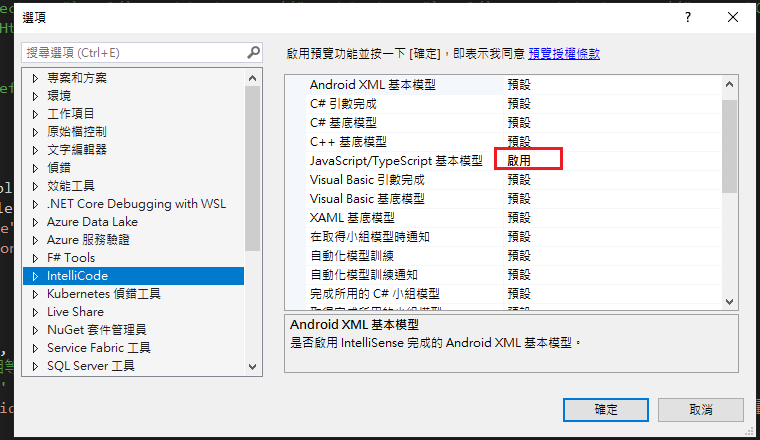
Visual Studio JS intellisense 失效解決方式
試了好久,發現到工具>選項>IntelliCode js項目設定啟用,重新開啟VS就正常了! 後來發現是TypeScript3.2版有問題停用,使用4.3版的TypeScript即可
-
開啟記事本將以下程式碼貼入存成.bat @ECHO OFF set x=%date:~0,4%%date:~5,2%%date:~8,2% CD C:\Windows\System32\winevt\Logs COPY Application.evtx D:\bak\...
-
使用truncate table 時會出現 無法截斷資料表 'xxx',因為該資料表正由 FOREIGN KEY 條件約束參考解決方式 先刪除再重建自動編號即可。 DELETE table; DBCC CHECKIDENT('table...
