重新賦予月曆 minDate/maxDate新的值
加這句即可 $('#CheckoutDate').datepick('destroy');
點選按鈕載入ReloadCheckDate
function ReloadCheckDate(checkInDate, checkOutDate) {
$('#CheckoutDate').datepick('destroy');
$('#CheckoutDate').datepick({
minDate: checkInDate,
maxDate: checkOutDate, showTrigger: '#calImg'
});
}
2014年11月25日 星期二
2014年11月21日 星期五
C#合併兩個Dictionary
使用Dictionary類別的擴充方法Concat串接兩個序列
Dictionary<Guid, ViewModel.EventModel> events = roomOpenService.GetRoomOpenEvents(roomListID);
events = events.Concat(roomBookingService.GetRoomBookingEvents(roomListID)).ToDictionary(k => k.Key, v => v.Value);
Dictionary<Guid, ViewModel.EventModel> events = roomOpenService.GetRoomOpenEvents(roomListID);
events = events.Concat(roomBookingService.GetRoomBookingEvents(roomListID)).ToDictionary(k => k.Key, v => v.Value);
2014年10月13日 星期一
Access Update 無法更新解決方式
目前有一案子因主機只支援Access,所以只能使用OleDb
在下更新指令時seq 裡的參數順序一定要跟宣告的OleDbParameter順序一樣喔,
不然更新是無作用而且也不會報錯
OleDbParameter[] p = new OleDbParameter[3];
p[0] = new OleDbParameter("@NewsName", newsName); 1
p[1] = new OleDbParameter("@Content", content); 2
p[2] = new OleDbParameter("@ID", newsID); 3
string seq = "Update News Set NewsName = @NewsName, Content = @Content Where ID = @ID";
在下更新指令時seq 裡的參數順序一定要跟宣告的OleDbParameter順序一樣喔,
不然更新是無作用而且也不會報錯
OleDbParameter[] p = new OleDbParameter[3];
p[0] = new OleDbParameter("@NewsName", newsName); 1
p[1] = new OleDbParameter("@Content", content); 2
p[2] = new OleDbParameter("@ID", newsID); 3
string seq = "Update News Set NewsName = @NewsName, Content = @Content Where ID = @ID";
2014年10月9日 星期四
T-SQL 暫存表使用方式
--暫存在記憶體中
DECLARE @RoomOpenTmp Table
(
ID INT,
RoomListID INT,
StartDate DATETIME,
EndDate DATETIME
)
--將資料放入暫存表中
INSERT @RoomOpenTmp
SELECT ID,
RoomListID,
StartDate,
EndDate
FROM RoomOpen;
--直接取用
-- SELECT * FROM @RoomOpenTmp
DECLARE @RoomOpenTmp Table
(
ID INT,
RoomListID INT,
StartDate DATETIME,
EndDate DATETIME
)
--將資料放入暫存表中
INSERT @RoomOpenTmp
SELECT ID,
RoomListID,
StartDate,
EndDate
FROM RoomOpen;
--直接取用
-- SELECT * FROM @RoomOpenTmp
2014年10月7日 星期二
QlikView基本介紹
這套BI工具由瑞典人於1993年創建的公司所研發,是我目前所知道還滿強大的即時分析軟體,
可提供公司決策者從不同的面向分析資料挖掘未知的資訊擬定作戰策略.
可至官方網站下載免費版 http://www.qlik.com/
安裝完畢後執行
未完待續.....
可提供公司決策者從不同的面向分析資料挖掘未知的資訊擬定作戰策略.
可至官方網站下載免費版 http://www.qlik.com/
安裝完畢後執行
![]() |
| 這是起始畫面左邊區塊為範本區,直接點擊可瀏覽範例檔 |
未完待續.....
2014年9月25日 星期四
C# Interface用法
Interface其中一個好處是多個類別可繼承同個介面,
聽起來有點抽象是什麼意思呢?
以我目前的理解來解釋一下;
例如有一個新增會員功能與新增學生功能,這兩個都會用到新增這個功能,
我們就可以把這個新增的部分抽離出來寫成Interface.
以下是基本用法,等更熟悉後再實作複雜一點的
1.建立介面
interface IAction
{
//新增
void Add();
}
2.建立會員類別繼承介面並實作介面
class MemberRepository : IAction
{
void IAction.Add()
{
MessageBox.Show("已新增會員");
}
}
3.建立學生類別繼承介面並實作介面
class StudentRepository : IAction
{
void IAction.Add()
{
MessageBox.Show("已新增學生");
}
}
4.主程式部分
//新增會員
private void button1_Click(object sender, EventArgs e)
{
IAction _memberRepository = new MemberRepository();
_memberRepository.Add();
}
//新增學生
private void button2_Click(object sender, EventArgs e)
{
IAction _studentRepository = new StudentRepository();
_studentRepository.Add();
}
聽起來有點抽象是什麼意思呢?
以我目前的理解來解釋一下;
例如有一個新增會員功能與新增學生功能,這兩個都會用到新增這個功能,
我們就可以把這個新增的部分抽離出來寫成Interface.
以下是基本用法,等更熟悉後再實作複雜一點的
1.建立介面
interface IAction
{
//新增
void Add();
}
2.建立會員類別繼承介面並實作介面
class MemberRepository : IAction
{
void IAction.Add()
{
MessageBox.Show("已新增會員");
}
}
3.建立學生類別繼承介面並實作介面
class StudentRepository : IAction
{
void IAction.Add()
{
MessageBox.Show("已新增學生");
}
}
4.主程式部分
//新增會員
private void button1_Click(object sender, EventArgs e)
{
IAction _memberRepository = new MemberRepository();
_memberRepository.Add();
}
//新增學生
private void button2_Click(object sender, EventArgs e)
{
IAction _studentRepository = new StudentRepository();
_studentRepository.Add();
}
2014年9月24日 星期三
Javascript取得Json資料
JData =
{
"Status": "Y",
"Message": "Success",
"Data": [
{
"CourseId": "xx0001",
"CourseName": "國文"
}
]
}
//使用each取得資料
var i = 0;
$.each(JData.Data, function ()
{
//這裡自行處理
alert(json.Data[i].CourseName)
i++;
});
訂閱:
文章 (Atom)
Visual Studio JS intellisense 失效解決方式
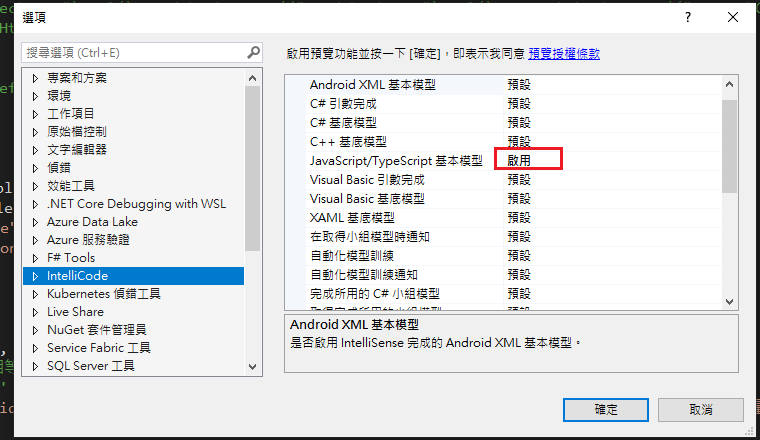
試了好久,發現到工具>選項>IntelliCode js項目設定啟用,重新開啟VS就正常了! 後來發現是TypeScript3.2版有問題停用,使用4.3版的TypeScript即可
-
開啟記事本將以下程式碼貼入存成.bat @ECHO OFF set x=%date:~0,4%%date:~5,2%%date:~8,2% CD C:\Windows\System32\winevt\Logs COPY Application.evtx D:\bak\...
-
使用truncate table 時會出現 無法截斷資料表 'xxx',因為該資料表正由 FOREIGN KEY 條件約束參考解決方式 先刪除再重建自動編號即可。 DELETE table; DBCC CHECKIDENT('table...