1 2 3 4 5 6 7 8 9 10 11 12 13 14 | //宣告委派型別 public delegate void ; private void public static void |
2013年12月13日 星期五


2013年10月30日 星期三
iframe 子視窗呼叫母視窗函式並關閉視窗
母視窗
html
<iframe id="iframe01" src="/test/A/" height="450px" frameborder="0" width="100%">你的瀏覽器竟然不支援 iframe</iframe>
js
使用dialog開啟子視窗,因子視窗為上傳檔案故無使用ajax方式
$("#subMenu").dialog("open");
子視窗也是使用iframe
<iframe id="iframe02" src="/test/B/" height="300px" frameborder="0" width="100%">你的瀏覽器竟然不支援 iframe</iframe>
//關閉視窗 供子視窗呼叫使用
function closeUpLoadWindows() {
$.growlUI('檔案資訊已更新!', '您辛苦了');
$("#subMenu").dialog("close");
}
子視窗
$('#form1').submit(function () {
return valid_form();
});
//驗證上傳欄位
function valid_form() {
if ($("#Version").val() == "") {
alert("請填入版本");
return false;
}
else if ($("#file").val() == "") {
alert("請選擇檔案!");
return false;
}
else {
//關閉視窗
if (window.parent.document) {
window.parent.closeUpLoadWindows(); //call 母視窗js
}
}
}
畫面
2013年10月9日 星期三
JavaScript switch使用方式
function CheckFileType(filetype, version, fileurl) {
switch (filetype) {
case 86: return $("#spanFileInfo1").html("版本:" + version + " 檔名:" + fileurl);
case 87: return $("#spanFileInfo2").html("版本:" + version + " 檔名:" + fileurl);
case 88: return $("#spanFileInfo3").html("版本:" + version + " 檔名:" + fileurl);
case 89: return $("#spanFileInfo4").html("版本:" + version + " 檔名:" + fileurl);
case 90: return $("#spanFileInfo5").html("版本:" + version + " 檔名:" + fileurl);
case 91: return $("#spanFileInfo6").html("版本:" + version + " 檔名:" + fileurl);
}
}
2013年7月22日 星期一
fb讚語法
針對不同連結案讚
重點在這一段:expr:href='data:post.url'
將以下語法貼在body中即可
<div id="fb-root"></div>
<script>(function(d, s, id) {
var js, fjs = d.getElementsByTagName(s)[0];
if (d.getElementById(id)) return;
js = d.createElement(s); js.id = id;
js.src = "//connect.facebook.net/zh_TW/all.js#xfbml=1";
fjs.parentNode.insertBefore(js, fjs);
}(document, 'script', 'facebook-jssdk'));</script>
<fb:like expr:href='data:post.url' send="false" layout="button_count" width="400" show_faces="true"></fb:like>
2013年7月1日 星期一
2013年6月7日 星期五
DropDownListFor 驗證失效
mvc3 下 DropDownList驗證失效加入以下即可解決
new { data_val_required = "請輸入類別", data_val = "true" }
@Html.DropDownListFor(m => m.DepartmentID, (SelectList)ViewBag.DepartmentID, "==請選擇部門==", new { data_val_required = "*", data_val = "true" })
2013年5月29日 星期三
rdlc報表使用方式
1.先建立好rdlc資料來源
2.建立一個.aspx頁面
3.在頁面放入ScriptManager控制項
4.放入ReportViewer控制項
說明:
Session["SearchList"] 型態為Datatable 請自行處理
report.aspx
<asp:ScriptManager ID="ScriptManager1" runat="server">
</asp:ScriptManager>
<asp:ScriptManager ID="ScriptManager1" runat="server">
</asp:ScriptManager>
<rsweb:ReportViewer ID="ReportViewer1" runat="server"
Font-Names="Verdana"
Font-Size="8pt"
InteractiveDeviceInfos="(集合)"
WaitMessageFont-Names="Verdana"
WaitMessageFont-Size="14pt"
Height="500px"
Width="1000px" >
</rsweb:ReportViewer>
protected void Page_Load(object sender, EventArgs e)
{
if (!IsPostBack)
{
ReportViewer1.LocalReport.DataSources.Clear();
ReportViewer1.LocalReport.ReportPath = "D:\\Project\\OrderMReport.rdlc";
ReportViewer1.LocalReport.DataSources.Add(new Microsoft.Reporting.WebForms.ReportDataSource("DataSet1", Session["SearchList"]));
}
}
訂閱:
文章 (Atom)
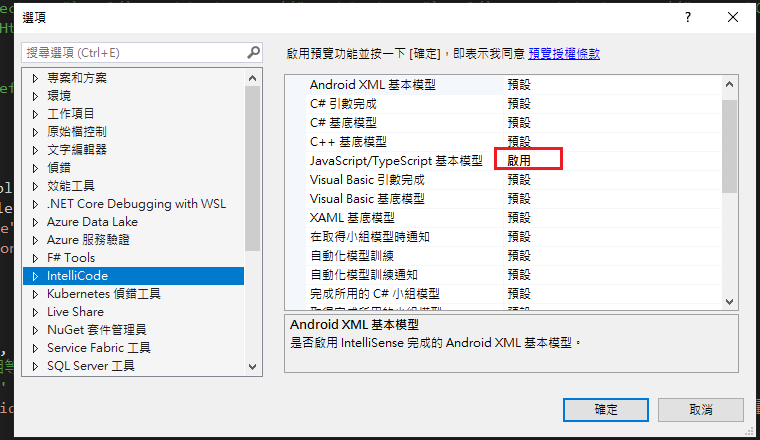
Visual Studio JS intellisense 失效解決方式
試了好久,發現到工具>選項>IntelliCode js項目設定啟用,重新開啟VS就正常了! 後來發現是TypeScript3.2版有問題停用,使用4.3版的TypeScript即可
-
開啟記事本將以下程式碼貼入存成.bat @ECHO OFF set x=%date:~0,4%%date:~5,2%%date:~8,2% CD C:\Windows\System32\winevt\Logs COPY Application.evtx D:\bak\...
-
使用truncate table 時會出現 無法截斷資料表 'xxx',因為該資料表正由 FOREIGN KEY 條件約束參考解決方式 先刪除再重建自動編號即可。 DELETE table; DBCC CHECKIDENT('table...
