1 2 3 4 5 6 7 8 9 10 11 12 13 14 15 16 17 | { if (dgv.Rows.Count != 0) { for (int i = 0; i < dgv.Rows.Count; i++) { if ((i % 2) == 1) { dgv.Rows[i].DefaultCellStyle.BackColor = System.Drawing.Color.Snow; } else { dgv.Rows[i].DefaultCellStyle.BackColor = System.Drawing.Color.LightBlue; } } } } |
2012年10月30日 星期二
DataGridView資料列交錯顏色

2012年10月16日 星期二
2012年10月12日 星期五
2012年10月5日 星期五
DropDownListFor 顯示資料庫值
1 2 3 4 5 6 7 8 9 10 11 12 13 14 15 16 17 18 19 20 21 22 23 24 25 26 27 28 29 30 | Controller { ViewBag.SiteTypeList = SF.CreatDropDownList(7); ); } View id = "ID" 會自動對應資料庫值 @Html.DropDownListFor(m => m.SiteID, (SelectList)ViewBag.SiteTypeList, new { id = "ID" }) Model { using (AbobSysEntities db = new AbobSysEntities()) { var query = db.ProductAbnormalRecord.Where(f => f.ID == id).First(); return new PARColumn { SiteID = Convert.ToString(query.SiteID), WorkOrderNum = query.WorkOrderNum }; } } public string SiteID { get; set; } } |
2012年10月4日 星期四
entity 顯示單一欄位
string result = "";
using (xxx db = new xxx())
{
result = db.MasterCodeDetail
.Where(f => f.ID == siteID)
.Select(f => new { f.Name })
.FirstOrDefault().Name.ToString();
}
return result;
2012年9月28日 星期五
將datetime2 資料類型轉換成datetime 資料類型時,產生超出範圍的值。
請先將edmx用記事本開啟 找到你的欄位並做以下修改即可
原本
<Property Name="CreatDate" Type="datetime" Nullable="false" />
更改後
<Property Name="CreatDate" Type="datetime" Nullable="false" StoreGeneratedPattern ="Computed"/>
原本
<Property Name="CreatDate" Type="datetime" Nullable="false" />
更改後
<Property Name="CreatDate" Type="datetime" Nullable="false" StoreGeneratedPattern ="Computed"/>
2012年9月26日 星期三
DataGridView 統計欄位
int sum = 0;
for (int i = 0; i < dataGridView1.Rows.Count; ++i)
{
sum += Convert.ToInt32(dataGridView1.Rows[i].Cells[1].Value);
}
labelTotal.Text = sum.ToString();
for (int i = 0; i < dataGridView1.Rows.Count; ++i)
{
sum += Convert.ToInt32(dataGridView1.Rows[i].Cells[1].Value);
}
labelTotal.Text = sum.ToString();
訂閱:
文章 (Atom)
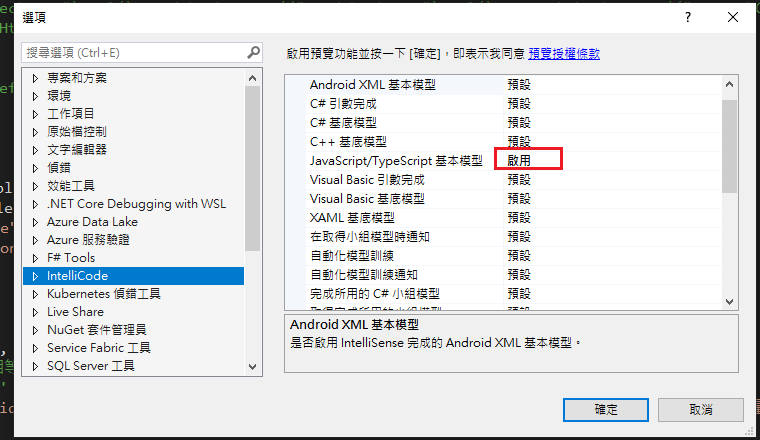
Visual Studio JS intellisense 失效解決方式
試了好久,發現到工具>選項>IntelliCode js項目設定啟用,重新開啟VS就正常了! 後來發現是TypeScript3.2版有問題停用,使用4.3版的TypeScript即可