dos
tracert 168.95.1.1
2012年4月17日 星期二
2012年3月28日 星期三
2012年3月23日 星期五
2012年2月20日 星期一
2012年2月9日 星期四
c#抽象類別與介面定義
抽象類別:
是用來定義相同種類的物件,所需要具備的共通特性;例如動物(Animal),是所有動物的基底,所有動物具有吃、喝、睡覺等等共同的特性,但是,每種動物吃的東西不一樣(人類屬雜食,老虎只吃肉...),所以我們可以將這些基本特性,寫成抽象類別與方法,讓其他類別來繼承並且實做方法,這就就抽象類別的意義。
介面:
是用來定義不同種類的物件中,針對某種特性,所需要具備的相同功能;我們說,飛機(airplane)會飛,鳥(bird)也會飛,這兩個物件是不同種類的,可是他們都具有會飛的特性,差別在於飛行的方式不同,一個靠機械完成,一個則是拍動翅膀,所以,我們可以將飛行(Fly)寫成介面,物件只要繼承這個介面並且方法,該物件就具有飛行的特性了。
另一種思考:
- 類別是對物件的抽象:建構物件的各式成員與行為模式。
- 抽象類別是對類別的抽象:提供基底,專門給同性質的類別繼承。
- 介面是對行為的抽象:任何類別若繼承介面並且實做後,皆具有此功能。
以上定義來源出自:.NET 隨筆
2012年2月3日 星期五
jquery尋找select
1
2
3
4
5
6
7
8
9
10
11
12
13
14
15
16
17
18
19
20
var orderCount = 0;
var selectRoom = "";
//尋找id:roomTable底下所有名稱為roomqty的下拉選單
var roomqty = $('#roomTable').find("select[name='roomqty']");
//找出有幾個下拉選單
for (var i = 0; i < roomqty.size(); i++) {
//並將值不是0的組成字串
if (roomqty.get(i).selectedIndex != 0) {
selectRoom += roomqty.eq(i).val();
orderCount++;
}
}
if (orderCount == 0) {
alert("您尚未選擇任何房型! 請選擇房間數量");
return false;
}
2012年2月2日 星期四
css按鈕樣式
1
2
3
4
5
6
7
8
9
10
11
12
13
14
15
16
17
18
19
20
21
22
23
24
25
26
27
28
29
30
31
32
33
34
35
36
37
38
39
40
41
42
43
44
45
46
47
48
49
50
51
52
53
54
55
56
57
58
59
60
61
62
63
64
65
66
67
68
.styled-button-1 {
-webkit-box-shadow: rgba(0, 0, 0, 0.199219) 0px 1px 0px 0px;
background-color: #FA2;
border-radius: 5px;
border-bottom-color: #333;
border: none;
border-width: 0;
box-shadow: rgba(0, 0, 0, 0.199219) 0px 1px 0px 0px;
color: #333;
font-family: 'Helvetica Neue', Arial, sans-serif;
font-size: 16px;
font-weight: bold;
height: 32px;
padding: 4px 16px;
text-shadow: #FE6 0px 1px 0px;
}
.styled-button-2 {
-webkit-box-shadow: rgba(0, 0, 0, 0.2) 0px 1px 0px 0px;
background-color: #7cceee;
border-radius: 5px;
border-bottom-color: #333;
border: 1px solid #61c4ea;
box-shadow: rgba(0, 0, 0, 0.2) 0px 1px 0px 0px;
color: #333;
font-family: 'Verdana', Arial, sans-serif;
font-size: 14px;
text-shadow: #b2e2f5 0px 1px 0px;
padding: 5px;
}
.styled-button-3 {
-webkit-box-shadow: rgba(0, 0, 0, 0.0.97) 0px 1px 0px 0px;
background-color: #5B74A8;
border: 1px solid #29447E;
font-family: 'Lucida Grande', Tahoma, Verdana, Arial, sans-serif;
font-size: 12px;
font-weight: bold;
padding: 2px 6px;
height: 28px;
color: #fff;
border-radius: 5px;
}
.styled-button-4 {
-webkit-box-shadow: rgba(0, 0, 0, 0.0976562) 0px 1px 0px 0px;
background-color: #EEE;
border: 1px solid #999;
color: #666;
font-family: 'Lucida Grande', Tahoma, Verdana, Arial, Sans-serif;
font-size: 11px;
font-weight: bold;
padding: 2px 6px;
height: 28px;
}
.styled-button-5 {
background-color: #ed8223;
color: white;
font-family: 'Helvetica Neue', sans-serif;
font-size: 18px;
line-height: 30px;
border-radius: 20px;
border: 0px;
text-shadow: #C17C3A 0px -1px 0px;
width: 120px;
height: 32px;
}
訂閱:
文章 (Atom)
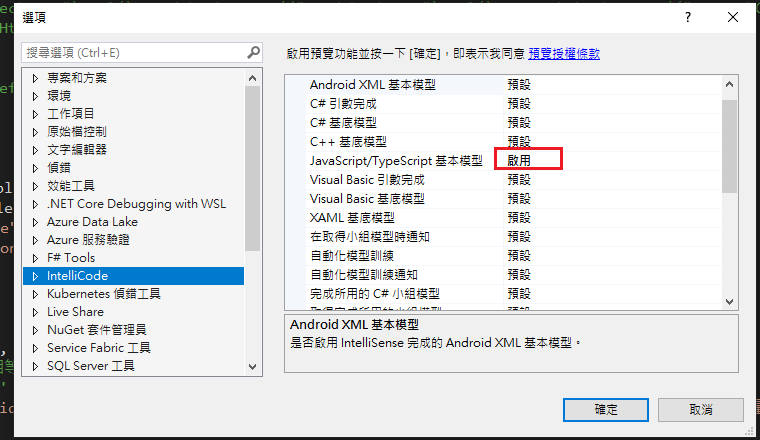
Visual Studio JS intellisense 失效解決方式
試了好久,發現到工具>選項>IntelliCode js項目設定啟用,重新開啟VS就正常了! 後來發現是TypeScript3.2版有問題停用,使用4.3版的TypeScript即可
-
開啟記事本將以下程式碼貼入存成.bat @ECHO OFF set x=%date:~0,4%%date:~5,2%%date:~8,2% CD C:\Windows\System32\winevt\Logs COPY Application.evtx D:\bak\...
-
使用truncate table 時會出現 無法截斷資料表 'xxx',因為該資料表正由 FOREIGN KEY 條件約束參考解決方式 先刪除再重建自動編號即可。 DELETE table; DBCC CHECKIDENT('table...

