1
2
3
4
5
6
7
8
9
10
11
12
13
14
15
16
17
18
19
20
var orderCount = 0;
var selectRoom = "";
//尋找id:roomTable底下所有名稱為roomqty的下拉選單
var roomqty = $'#roomTable'find"select[name='roomqty']";
//找出有幾個下拉選單
for var i = 0; i < roomqtysize; i++
//並將值不是0的組成字串
if roomqtygetiselectedIndex != 0
selectRoom += roomqtyeqival;
orderCount++;
if orderCount == 0
alert"您尚未選擇任何房型! 請選擇房間數量";
return false;
2012年2月3日 星期五
jquery尋找select

2012年2月2日 星期四
2012年1月30日 星期一
Lambda比對資料庫日期
 var hotelInfo = db.vwGetHotelRoomQty
  .Where(f => f.OpenDate.Year == checkinDate.Year && f.OpenDate.Month == checkinDate.Month && f.OpenDate.Day == checkinDate.Day)
 .Where(f => f.HotelRoomID == roomid).ToList();
2012年1月19日 星期四
可用於判斷日期小於今日的話 將不觸發dayClick事件
1
2
3
4
5
6
7
8
9
10
11
var today=;
iftodaygetHours != 0 && todaygetMinutes != 0 &&
todaygetSeconds != 0 && todaygetMilliseconds != 0
todaysetHours0000;
if date<today
alert"小於今天喔!";
2012年1月18日 星期三
c# var
var型態是由右方運算式所指定的
1
2
3
4
5
6
7
8
9
10
11
12
13
14

var hotelInfo = db.vwGetHotelOpenDateByHID
                .Where(f => f.HID == hid)
                .Select(f => f).ToList();


 foreach (var item in hotelInfo)
{
  result.Add(new HotelModel
  {
    hid = Convert.ToString(item.HID),
    openDate = Convert.ToString(item.OpenDate),
    openQty = Convert.ToString(item.LastQty)
   });
}
2012年1月12日 星期四
標准DIV+CSS命名規則
標准DIV+CSS命名規則
頁頭:header
登錄條:loginBar
標志:logo
側欄:sideBar
廣告:banner
導航:nav
子導航:subNav
菜單:menu
子菜單:subMenu
搜尋:search
滾動:scroll
頁面主體:main
內容:content
標簽頁:tab
文章列表:list
提示訊息:msg
小技巧:tips
欄目標題:title
加入:joinus
指南:guild
服務:service
熱點:hot
資訊:news
下載:download
注冊:regsiter
狀態:status
按鈕:btn
投票:vote
合作夥伴:partner
友情連結:friendLink
頁腳:footer
版權:copyRight
1.CSS ID 的命名
外 套: wrap
主導航: mainNav
子導航: subnav
頁 腳: footer
整個頁面: content
頁 眉: header
頁 腳: footer
商 標: label
標 題: title
主導航: mainNav(globalNav)
頂導航: topnav
邊導航: sidebar
左導航: leftsideBar
右導航: rightsideBar
旗 志: logo
標 語: banner
菜單內容1: menu1Content
菜單容量: menuContainer
子菜單: submenu
邊導航圖標:sidebarIcon
注釋: note
面包屑: breadCrumb(即頁面所處位置導航提示)
容器: container
內容: content
搜尋: search
登陸: login
功能區: shop(如購物車,收銀台)
當前的 current
2.另外在編輯樣式表時可用的注釋可這樣寫:
<-- Footer -->
內容區
<-- End Footer -->
3.樣式文件命名
主要的 master.css
布局,版面 layout.css
專欄 columns.css
文字 font.css
列印樣式 print.css
主題 themes.css
資料來源:
本篇文章來源于 [維奇素材網] 轉載請以連結形式注明出處 網址:
http://big5.veeqi.com/learn/xhtml/20080111/1172.html
頁頭:header
登錄條:loginBar
標志:logo
側欄:sideBar
廣告:banner
導航:nav
子導航:subNav
菜單:menu
子菜單:subMenu
搜尋:search
滾動:scroll
頁面主體:main
內容:content
標簽頁:tab
文章列表:list
提示訊息:msg
小技巧:tips
欄目標題:title
加入:joinus
指南:guild
服務:service
熱點:hot
資訊:news
下載:download
注冊:regsiter
狀態:status
按鈕:btn
投票:vote
合作夥伴:partner
友情連結:friendLink
頁腳:footer
版權:copyRight
1.CSS ID 的命名
外 套: wrap
主導航: mainNav
子導航: subnav
頁 腳: footer
整個頁面: content
頁 眉: header
頁 腳: footer
商 標: label
標 題: title
主導航: mainNav(globalNav)
頂導航: topnav
邊導航: sidebar
左導航: leftsideBar
右導航: rightsideBar
旗 志: logo
標 語: banner
菜單內容1: menu1Content
菜單容量: menuContainer
子菜單: submenu
邊導航圖標:sidebarIcon
注釋: note
面包屑: breadCrumb(即頁面所處位置導航提示)
容器: container
內容: content
搜尋: search
登陸: login
功能區: shop(如購物車,收銀台)
當前的 current
2.另外在編輯樣式表時可用的注釋可這樣寫:
<-- Footer -->
內容區
<-- End Footer -->
3.樣式文件命名
主要的 master.css
布局,版面 layout.css
專欄 columns.css
文字 font.css
列印樣式 print.css
主題 themes.css
資料來源:
本篇文章來源于 [維奇素材網] 轉載請以連結形式注明出處 網址:
http://big5.veeqi.com/learn/xhtml/20080111/1172.html
訂閱:
文章 (Atom)
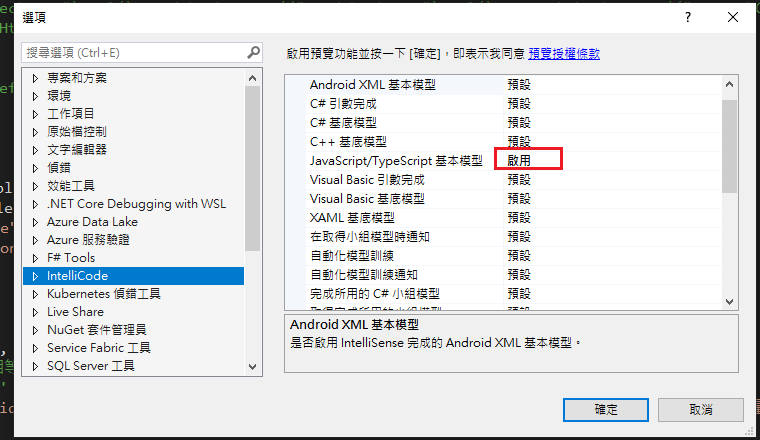
Visual Studio JS intellisense 失效解決方式
試了好久,發現到工具>選項>IntelliCode js項目設定啟用,重新開啟VS就正常了! 後來發現是TypeScript3.2版有問題停用,使用4.3版的TypeScript即可
-
開啟記事本將以下程式碼貼入存成.bat @ECHO OFF set x=%date:~0,4%%date:~5,2%%date:~8,2% CD C:\Windows\System32\winevt\Logs COPY Application.evtx D:\bak\...
-
使用truncate table 時會出現 無法截斷資料表 'xxx',因為該資料表正由 FOREIGN KEY 條件約束參考解決方式 先刪除再重建自動編號即可。 DELETE table; DBCC CHECKIDENT('table...
