先筆記一下
1.nameof 表示式
2.字串插值
3.Null 條件運算子
請參考
https://www.huanlintalk.com/2015/01/csharp6-enhanced-expressions.html
https://docs.microsoft.com/zh-tw/dotnet/csharp/language-reference/keywords/nameof
https://docs.microsoft.com/zh-tw/dotnet/csharp/tutorials/string-interpolation
https://docs.microsoft.com/zh-tw/dotnet/csharp/language-reference/operators/null-conditional-operators
2018年10月26日 星期五

2018年10月23日 星期二
[AutoMapper]使用方式
1.使用Nuget 搜尋套件AutoMapper並安裝

2. namespace 加入 using AutoMapper;
3.以下為基本使用方式
var query = db.vw_SchoolStdTotal.ToList();
var config = new MapperConfiguration(cfg => cfg.CreateMap<vw_SchoolStdTotal, SchoolStdTotalDataModel>());
config.AssertConfigurationIsValid();
var mapper = config.CreateMapper();
result = mapper.Map<List<vw_SchoolStdTotal>, List<SchoolStdTotalDataModel>>(query);
var config = new MapperConfiguration(
cfg => cfg.CreateMap<SchoolStdTotalDataModel, vw_SchoolStdTotalViewModel>()
//忽略此欄對應
.ForMember(d => d.SchoolName, o => o.Ignore())
.ForMember(d => d.ProfessionGroupDetailName, o => o.MapFrom(s => s.ProfessionGroupDetailName == null ? "國中部" : s.ProfessionGroupDetailName))
 //資料源使用function處理
.ForMember(d => d.Button, o => o.MapFrom(s => dataListButton.ForGetTotalNumberHighSchoolList(desFun.DESEncrypt(s.ID.ToString())))));
更新資料寫法
不需要的欄位使用Ignore排除,關聯Key也要排除不然會出錯
     var query = db.PersonalInfo.Where(f => f.ID == ID).FirstOrDefault();
         if (query != null)
         {
             var config = new MapperConfiguration(
                 cfg => cfg.CreateMap()
                           .ForMember(d => d.x1, o => o.Ignore())
                           .ForMember(d => d.x2, o => o.Ignore())
                           .ForMember(d => d.ModifyDate, o => o.MapFrom(s => DateTime.Now)));
             config.AssertConfigurationIsValid();
             var mapper = config.CreateMapper();
             //PersonalInfo personalInfo = db.PersonalInfo.Find(21);
             mapper.Map(viewModel, query);
             db.SaveChanges();
         }
未完待續.......
參考來源
https://automapper.org/
2018年7月3日 星期二
[Jquery]找到td位置並將值帶入CheckBox
選擇下拉選單時將預設CheckBox Value置換成下拉選單所選的值
以上圖片 function名稱更正為ReSetCheckBoxVal
<td>
<input name="selectCourse[]" type="checkbox" class="cbxDate2" value="001" >
<select onchange="ReSetCheckBoxVal(this);">
<option>請選擇任課教師</option>
<option value="001">001</option>
<option value="002">002</option>
</select>
</td>
function ReSetCheckBoxVal(value) {
var td = $(value).closest('td'); //找到td位置
var getCheckBox = td.find('input:checkbox'); //找到td位置裡的checkbox
getCheckBox.val($(value).val()); //將下拉選單值塞入找到的checkbox
}
 |
| 置換前 |
 |
| 置換後 |
<td>
<input name="selectCourse[]" type="checkbox" class="cbxDate2" value="001" >
<select onchange="ReSetCheckBoxVal(this);">
<option>請選擇任課教師</option>
<option value="001">001</option>
<option value="002">002</option>
</select>
</td>
function ReSetCheckBoxVal(value) {
var td = $(value).closest('td'); //找到td位置
var getCheckBox = td.find('input:checkbox'); //找到td位置裡的checkbox
getCheckBox.val($(value).val()); //將下拉選單值塞入找到的checkbox
}
2018年6月25日 星期一
[Bootstrap]多層視窗的遮罩
$(document).on({
'show.bs.modal': function() {
var zIndex = 1040 + (10 * $('.modal:visible').length);
$(this).css('z-index', zIndex);
setTimeout(function() {
$('.modal-backdrop').not('.modal-stack').css('z-index', zIndex - 1).addClass('modal-stack');
}, 0);
},
'hidden.bs.modal': function() {
if ($('.modal:visible').length > 0) {
// restore the modal-open class to the body element, so that scrolling works
// properly after de-stacking a modal.
setTimeout(function() {
$(document.body).addClass('modal-open');
}, 0);
}
}
}, '.modal');
2018年6月5日 星期二

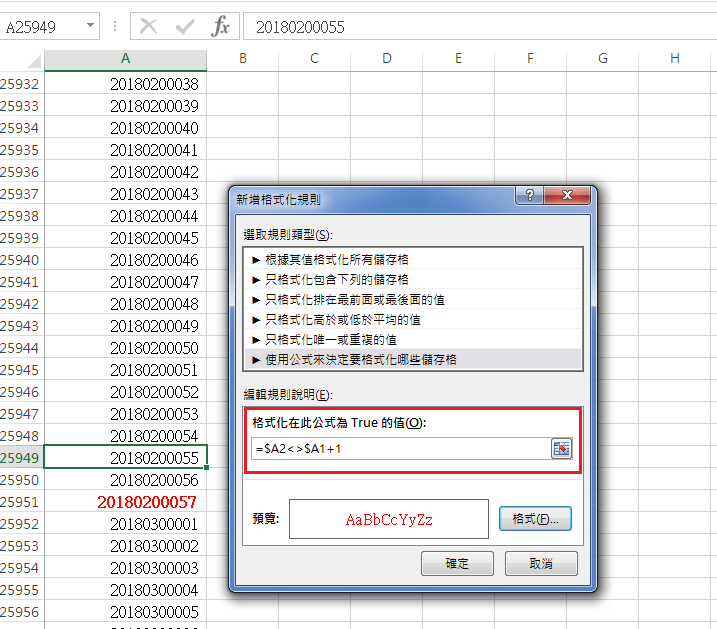
[SQL]找出P Key不連續編號
select beginId,
(select min(id)-1 from table where id > beginId) as endId
from (
select id+1 as beginId from table
where id+1 not in
(select id from table)
and id < (select max(id) from table)
) as t
參考資料: https://hk.saowen.com/a/3af383a9bedac1adf87c3dd66fc912d13d90555368f1ea66077c42e802f14880
2018年5月15日 星期二
[Qlik Sence]Stream裡的App消失
某些帳號看不見Stream裡面的App請照以下步驟即可
1.請到後臺Security rules

2.確認項目名稱Stream的Actions欄位是否為空,如為空請填入Read, Publish即可顯示。

請參考
https://community.qlik.com/thread/245034
1.請到後臺Security rules
2.確認項目名稱Stream的Actions欄位是否為空,如為空請填入Read, Publish即可顯示。

請參考
https://community.qlik.com/thread/245034
訂閱:
文章 (Atom)
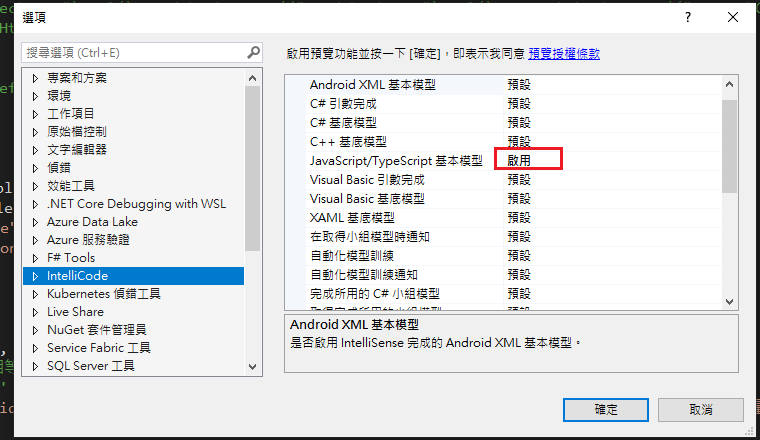
Visual Studio JS intellisense 失效解決方式
試了好久,發現到工具>選項>IntelliCode js項目設定啟用,重新開啟VS就正常了! 後來發現是TypeScript3.2版有問題停用,使用4.3版的TypeScript即可