開啟記事本將以下程式碼貼入存成.bat
@ECHO OFF
set x=%date:~0,4%%date:~5,2%%date:~8,2%
CD C:\Windows\System32\winevt\Logs
COPY Application.evtx D:\bak\EventLog\Application%x%.evtx
COPY Security.evtx D:\bak\EventLog\Security%x%.evtx
COPY Setup.evtx D:\bak\EventLog\Setup%x%.evtx
COPY System.evtx D:\bak\EventLog\System%x%.evtx
ECHO finish
產生檔名:System20180426.evtx
接下來至排程設定執行時間即可。
2018年4月26日 星期四

2018年4月24日 星期二
[C#]DataSet 不支援 System.Nullable<>解決方案
dt.Columns.Add(property.Name, Nullable.GetUnderlyingType(property.PropertyType) ?? property.PropertyType);
public DataTable ListToDataTable<T>(List<T> data)
{
PropertyDescriptorCollection properties = TypeDescriptor.GetProperties(typeof(T));
DataTable dt = new DataTable();
for (int i = 0; i < properties.Count; i++)
{
PropertyDescriptor property = properties[i];
//原本dt.Columns.Add(property.Name, property.PropertyType);
dt.Columns.Add(property.Name, Nullable.GetUnderlyingType(property.PropertyType) ?? property.PropertyType); //解決DataSet 不支援 System.Nullable<>
}
object[] values = new object[properties.Count];
foreach (T item in data)
{
for (int i = 0; i < values.Length; i++)
{
values[i] = properties[i].GetValue(item);
}
dt.Rows.Add(values);
}
return dt;
}
public DataTable ListToDataTable<T>(List<T> data)
{
PropertyDescriptorCollection properties = TypeDescriptor.GetProperties(typeof(T));
DataTable dt = new DataTable();
for (int i = 0; i < properties.Count; i++)
{
PropertyDescriptor property = properties[i];
//原本dt.Columns.Add(property.Name, property.PropertyType);
dt.Columns.Add(property.Name, Nullable.GetUnderlyingType(property.PropertyType) ?? property.PropertyType); //解決DataSet 不支援 System.Nullable<>
}
object[] values = new object[properties.Count];
foreach (T item in data)
{
for (int i = 0; i < values.Length; i++)
{
values[i] = properties[i].GetValue(item);
}
dt.Rows.Add(values);
}
return dt;
}
[Jquery]賦予動態產生物件事件
#RequestDept的內容是從後端產生,以下為賦予他change事件(其他事件也適用)
//使用$("body")也行
$(document).on("change", '#RequestDept', function () {
alert('我是從後端產生的');
});
//使用$("body")也行
$(document).on("change", '#RequestDept', function () {
alert('我是從後端產生的');
});
2018年4月2日 星期一
[Python]爬蟲初體驗
1.至官網下載Python https://www.python.org/
*安裝完成至控制台>系統設定環境變數指定到你安裝的資料夾 C:\Python36\
可參考 http://www.runoob.com/python/python-install.html
*開啟cmd 輸入python -V 成功會出現版本訊息
2.安裝Anaconda3 https://anaconda.org/c3i_test/anaconda3
*安裝完成會出現幾種開發Python工具,目前先紀錄Spyder使用狀況
Scrapy函式庫使用方式
Scrapy使用步驟
1.開啟Anaconda Prompt
2.cd到你的專案目錄下,如cd c:\ScraptTest 輸入pip install Scrapy 進行安裝函式庫
請參考 https://scrapy-chs.readthedocs.io/zh_CN/1.0/intro/install.html
3.執行產生專案指令scrapy startproject 專案名稱
4.在專案目錄下的spiders建一個py文建
5.輸出json,切換到spiders資料夾 cd c:\ScraptTest\apple\apple\spiders
執行scrapy runspider 程式檔案.py -o 輸出名稱.json
Selenium函式庫使用方式
請參考 https://www.seleniumhq.org/
這拿來做系統測試很好用
未完............................
*安裝完成至控制台>系統設定環境變數指定到你安裝的資料夾 C:\Python36\
可參考 http://www.runoob.com/python/python-install.html
*開啟cmd 輸入python -V 成功會出現版本訊息
2.安裝Anaconda3 https://anaconda.org/c3i_test/anaconda3
*安裝完成會出現幾種開發Python工具,目前先紀錄Spyder使用狀況
Scrapy函式庫使用方式
Scrapy使用步驟
1.開啟Anaconda Prompt
2.cd到你的專案目錄下,如cd c:\ScraptTest 輸入pip install Scrapy 進行安裝函式庫
請參考 https://scrapy-chs.readthedocs.io/zh_CN/1.0/intro/install.html
3.執行產生專案指令scrapy startproject 專案名稱
4.在專案目錄下的spiders建一個py文建
5.輸出json,切換到spiders資料夾 cd c:\ScraptTest\apple\apple\spiders
執行scrapy runspider 程式檔案.py -o 輸出名稱.json
Selenium函式庫使用方式
請參考 https://www.seleniumhq.org/
這拿來做系統測試很好用
未完............................
2018年3月14日 星期三
2018年2月26日 星期一
2018年2月6日 星期二
[C#]將前端傳來的資料轉成json格式
將前端傳來的資料格式為 "[\"yhchang\",\"sjlee\",\"hwcheng\"]"
我需要把他轉成字串陣列,需使用Newtonsoft.Json.Linq;
//轉成json格式
JArray jarray = JArray.Parse(form["ParticipantsArray"]);
//用string.Join以逗號串接再以Split分割逗號存成字串陣列
string[] participantsArray = string.Join(",", jarray.ToList()).Split(',');

或直接foreach jarray,看需求而定
foreach (var item in jarray)
{
string test = item.ToString();
}
我需要把他轉成字串陣列,需使用Newtonsoft.Json.Linq;
//轉成json格式
JArray jarray = JArray.Parse(form["ParticipantsArray"]);
//用string.Join以逗號串接再以Split分割逗號存成字串陣列
string[] participantsArray = string.Join(",", jarray.ToList()).Split(',');
或直接foreach jarray,看需求而定
foreach (var item in jarray)
{
string test = item.ToString();
}
訂閱:
文章 (Atom)
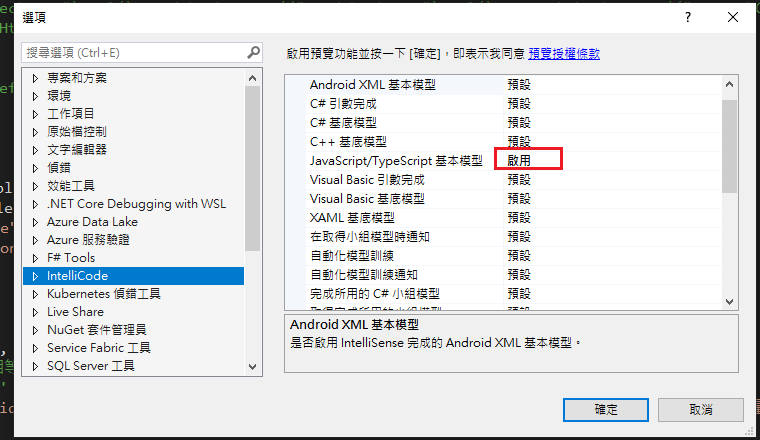
Visual Studio JS intellisense 失效解決方式
試了好久,發現到工具>選項>IntelliCode js項目設定啟用,重新開啟VS就正常了! 後來發現是TypeScript3.2版有問題停用,使用4.3版的TypeScript即可