
2015年1月8日 星期四

2015年1月2日 星期五
[JSON] 將傳回JSON日期格式化
Birthday傳回格式 : /Date(1418900173730)/
var parsedDate = new Date(parseInt(JData[i].Birthday.substr(6)));
var customBirthday = new Date(parsedDate);
customBirthday = customBirthday.getFullYear() + "/" + (customBirthday.getMonth() + 1) + "/" + customBirthday.getDate();
格式化後:2014/12/18
var parsedDate = new Date(parseInt(JData[i].Birthday.substr(6)));
var customBirthday = new Date(parsedDate);
customBirthday = customBirthday.getFullYear() + "/" + (customBirthday.getMonth() + 1) + "/" + customBirthday.getDate();
格式化後:2014/12/18
2014年12月31日 星期三
[SQL] IN 使用資料表值函示傳回table篩選條件
資料列表

1.建立function
CREATE FUNCTION GetWeekStrings (@roomListID int)
RETURNS TABLE
AS
RETURN (
SELECT [Week] FROM RoomOpenSet WHERE RoomListID= 1
)
2.找出資料Week欄位不等於 2,3,4
SELECT *, DATEPART(WEEKDAY, StartDate -1) as [Week] FROM RoomOpen WHERE RoomListID = 1 AND convert(varchar,DATEPART(WEEKDAY, StartDate -1)) not in
(
Select * From GetWeekStrings(1)
)
結果為下表,過濾掉星期2,3,4 只撈出星期五的資料

[SQL]如何將多筆資料列的值組成同一欄位
原本的資料列表
但是我想將Week欄位組成 2,3,4 使用stuff

select stuff(Strings.MarkUp,1,1,'') as [Week]
from
(
select RoomListID,
(
SELECT ',' +cast([Week] AS NVARCHAR)
FROM RoomOpenSet
WHERE RoomListID=ro2.RoomListID
for xml path('')
)MarkUp
from RoomOpenSet ro2
GROUP BY RoomListID
) as Strings
where RoomListID = 1
from
(
select RoomListID,
(
SELECT ',' +cast([Week] AS NVARCHAR)
FROM RoomOpenSet
WHERE RoomListID=ro2.RoomListID
for xml path('')
)MarkUp
from RoomOpenSet ro2
GROUP BY RoomListID
) as Strings
where RoomListID = 1
2014年12月17日 星期三
[JavaScript]格林威治時間轉換
dates = Fri Dec 19 2014 12:00:00 GMT+0800 (台北標準時間)
var d = new Date(dates);
var year = d.getFullYear();
var month = d.getMonth() + 1;
var day = d.getDate();
alert(year + "/" + month + "/" + day)
輸出結果: 2014/12/19
var d = new Date(dates);
var year = d.getFullYear();
var month = d.getMonth() + 1;
var day = d.getDate();
alert(year + "/" + month + "/" + day)
輸出結果: 2014/12/19
2014年12月15日 星期一
[MVC] DropDownListFor用法
View
@Html.DropDownListFor(m => m.Week, new SelectList((System.Collections.IEnumerable)ViewData["WeekList"], "Value", "Text"))
Controller
public ActionResult RoomOpenDateSet()
{
ViewData["WeekList"] = roomOpenSetService.GetRoomOpenSetWeeksByRoomListID(roomListID);
}
Class
public List<SelectListItem> CreatWeekDropDownList(string roomListID)
{
List<SelectListItem> items = new List<SelectListItem>();
var query = roomOpenSetService.GetRoomOpenSetWeeksByRoomListID(roomListID);
foreach (var item in query)
{
items.Add(new SelectListItem { Text = Enum.GetName(typeof(WeekList), item.Week), Value = item.Week.ToString() });
}
return items;
}
傳回html版==============================================================
[HttpPost]
public ActionResult GetWeekList(string roomListid)
{
return Json(sf.CreatWeekDropDownList(roomListid));
}
public string CreatWeekDropDownList(string roomListID)
{
List<SelectListItem> items = new List<SelectListItem>();
StringBuilder result = new StringBuilder();
int _roomListID = Convert.ToInt32(des.DESDecrypt(roomListID, "a"));
var userList = roomOpenSetService.GetRoomOpenSetWeeksByRoomListID(_roomListID);
result.Append("<select id=\"Week\" name=\"Week\">");
result.Append("<option value=\"0\">==請選擇星期==</option>");
foreach (var item in userList)
{
result.Append("<option value=\"" + item.Week + "\">" + item.Week + "</option>");
}
result.Append("</select>");
return result.ToString();
}
JS
$.ajax({
url: '/SpaceControl/GetWeekList/',
type: 'post',
data: { roomListid: roomListID },
cache: false,
async: false,
success: function (res) {
alert(res);
$("#Weeks").html(res);
},
error: function (x, e) {
window.location.href = "/Share/ErrorPage?err=500";
}
});
=======================================================================
列舉
public enum WeekList
{
一 = 1,
二 = 2,
三 = 3,
四 = 4,
五 = 5,
六 = 6,
日 = 7
}
@Html.DropDownListFor(m => m.Week, new SelectList((System.Collections.IEnumerable)ViewData["WeekList"], "Value", "Text"))
Controller
public ActionResult RoomOpenDateSet()
{
ViewData["WeekList"] = roomOpenSetService.GetRoomOpenSetWeeksByRoomListID(roomListID);
}
Class
public List<SelectListItem> CreatWeekDropDownList(string roomListID)
{
List<SelectListItem> items = new List<SelectListItem>();
var query = roomOpenSetService.GetRoomOpenSetWeeksByRoomListID(roomListID);
foreach (var item in query)
{
items.Add(new SelectListItem { Text = Enum.GetName(typeof(WeekList), item.Week), Value = item.Week.ToString() });
}
return items;
}
傳回html版==============================================================
[HttpPost]
public ActionResult GetWeekList(string roomListid)
{
return Json(sf.CreatWeekDropDownList(roomListid));
}
public string CreatWeekDropDownList(string roomListID)
{
List<SelectListItem> items = new List<SelectListItem>();
StringBuilder result = new StringBuilder();
int _roomListID = Convert.ToInt32(des.DESDecrypt(roomListID, "a"));
var userList = roomOpenSetService.GetRoomOpenSetWeeksByRoomListID(_roomListID);
result.Append("<select id=\"Week\" name=\"Week\">");
result.Append("<option value=\"0\">==請選擇星期==</option>");
foreach (var item in userList)
{
result.Append("<option value=\"" + item.Week + "\">" + item.Week + "</option>");
}
result.Append("</select>");
return result.ToString();
}
JS
$.ajax({
url: '/SpaceControl/GetWeekList/',
type: 'post',
data: { roomListid: roomListID },
cache: false,
async: false,
success: function (res) {
alert(res);
$("#Weeks").html(res);
},
error: function (x, e) {
window.location.href = "/Share/ErrorPage?err=500";
}
});
=======================================================================
列舉
public enum WeekList
{
一 = 1,
二 = 2,
三 = 3,
四 = 4,
五 = 5,
六 = 6,
日 = 7
}
2014年12月10日 星期三
DropDownListFor從資料庫讀取
暫時先記錄一下,後續再整理
View
@Html.DropDownListFor(m => m.CustomType, (SelectList)ViewBag.CustomTypeList, "==請選擇==")
Controller
ViewBag.CustomTypeList = sf.CreatMasterCodeDropDownList("CustomType");
Class
#region CreatMasterCodeDropDownList()-產生下拉選單
public SelectList CreatMasterCodeDropDownList(string columnName)
{
HotelSelectModels hsm = new HotelSelectModels();
SelectList DDLItem = new SelectList(hsm.GetMasterCodeByColumnName(columnName), "Value", "Name");
return DDLItem;
}
#endregion
Model
public List<HotelViewModel.MasterCodeModel> GetMasterCodeByColumnName(string columnName)
{
List<HotelViewModel.MasterCodeModel> result = new List<HotelViewModel.MasterCodeModel>();
using (HotelEntities db = new HotelEntities())
{
var query = db.MasterCode.Where(f => f.ColumnName == columnName).ToList();
if (query.Count > 0)
{
foreach (var item in query)
{
result.Add(new HotelViewModel.MasterCodeModel()
{
ColumnName = item.ColumnName,
Name = item.Name,
Value = item.Value
});
}
}
}
return result;
}
View
@Html.DropDownListFor(m => m.CustomType, (SelectList)ViewBag.CustomTypeList, "==請選擇==")
Controller
ViewBag.CustomTypeList = sf.CreatMasterCodeDropDownList("CustomType");
Class
#region CreatMasterCodeDropDownList()-產生下拉選單
public SelectList CreatMasterCodeDropDownList(string columnName)
{
HotelSelectModels hsm = new HotelSelectModels();
SelectList DDLItem = new SelectList(hsm.GetMasterCodeByColumnName(columnName), "Value", "Name");
return DDLItem;
}
#endregion
Model
public List<HotelViewModel.MasterCodeModel> GetMasterCodeByColumnName(string columnName)
{
List<HotelViewModel.MasterCodeModel> result = new List<HotelViewModel.MasterCodeModel>();
using (HotelEntities db = new HotelEntities())
{
var query = db.MasterCode.Where(f => f.ColumnName == columnName).ToList();
if (query.Count > 0)
{
foreach (var item in query)
{
result.Add(new HotelViewModel.MasterCodeModel()
{
ColumnName = item.ColumnName,
Name = item.Name,
Value = item.Value
});
}
}
}
return result;
}
訂閱:
文章 (Atom)
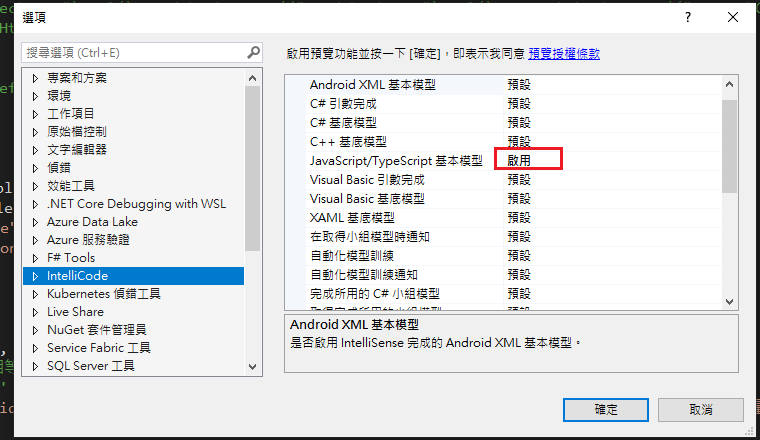
Visual Studio JS intellisense 失效解決方式
試了好久,發現到工具>選項>IntelliCode js項目設定啟用,重新開啟VS就正常了! 後來發現是TypeScript3.2版有問題停用,使用4.3版的TypeScript即可
-
開啟記事本將以下程式碼貼入存成.bat @ECHO OFF set x=%date:~0,4%%date:~5,2%%date:~8,2% CD C:\Windows\System32\winevt\Logs COPY Application.evtx D:\bak\...
-
使用truncate table 時會出現 無法截斷資料表 'xxx',因為該資料表正由 FOREIGN KEY 條件約束參考解決方式 先刪除再重建自動編號即可。 DELETE table; DBCC CHECKIDENT('table...
