1 2 3 4 5 6 7 8 9 10 11 12 13 14 15 16 17 18 19 20 21 22 23 24 25 26 | View @Html.DropDownList("ProductionType", (SelectList)ViewBag.ProductionTypeList, "請選擇生產類型") Model public IEnumerable<ProductionType> GetProductionTypeList() { IList<ProductionType> result = new List<ProductionType>(); using (AbobSysEntities db = new AbobSysEntities()) { var ProductionTypeList = db.MasterCodeDetail.ToList(); foreach (var item in ProductionTypeList) { result.Add(new ProductionType { ID = item.ID, Name = item.Name }); } } return result; } Control SelectList ProductionTypeList = new SelectList(TOM.GetProductionTypeList(), "ID", "Name"); ViewBag.ProductionTypeList = ProductionTypeList; |
2012年9月7日 星期五
MVC DropDownList讀取資料庫

Lambda join使用方式
Lambda join使用方式
f.Spec.Contains("Ver") 等同於 Spec like '%Ver %'
.Take(50) -撈出50筆
1 2 3 4 5 6 7 8 9 10 11 12 13 14 15 16 17 18 | |
2012年8月23日 星期四
點擊Label來勾選CheckBox
將ID 設為一樣即可
<input id="CheckBoxItemNum{@i}" type='checkbox' />
<label for="CheckBoxItemNum{@i}" class="cursor">@item.ItemName</label>
2012年8月7日 星期二
2012年7月5日 星期四
解決無法載入檔案或組件 'EntityFramework' 或其相依性的其中之一。
今天在開啟專案的時候出現
C:\Windows\Microsoft.NET\Framework\v4.0.30319\Temporary ASP.NET Files\root
無法載入檔案或組件 'EntityFramework' 或其相依性的其中之一。 參數錯誤。 (發生例外狀況於 HRESULT: 0x80070057 (E_INVALIDARG))
研判因該是電腦當機的時候還沒有編譯完成而導致此錯誤
刪除以下路徑內容即可恢復
C:\Windows\Microsoft.NET\Framework\v4.0.30319\Temporary ASP.NET Files\root
2012年6月26日 星期二
取當月第一天與最後一天
//取得當月第一天
DateTime FirstDay = new DateTime(DateTime.Now.Year, DateTime.Now.Month, 1);
//取得當月最後一天
DateTime LastDay = new DateTime(DateTime.Now.AddMonths(1).Year, DateTime.Now.AddMonths(1).Month, 1).AddDays(-1);
DateTime FirstDay = new DateTime(DateTime.Now.Year, DateTime.Now.Month, 1);
//取得當月最後一天
DateTime LastDay = new DateTime(DateTime.Now.AddMonths(1).Year, DateTime.Now.AddMonths(1).Month, 1).AddDays(-1);
2012年6月22日 星期五
訂閱:
文章 (Atom)
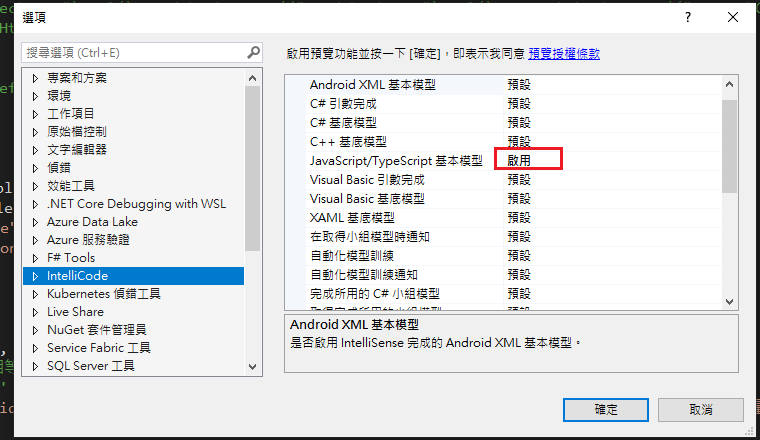
Visual Studio JS intellisense 失效解決方式
試了好久,發現到工具>選項>IntelliCode js項目設定啟用,重新開啟VS就正常了! 後來發現是TypeScript3.2版有問題停用,使用4.3版的TypeScript即可
-
開啟記事本將以下程式碼貼入存成.bat @ECHO OFF set x=%date:~0,4%%date:~5,2%%date:~8,2% CD C:\Windows\System32\winevt\Logs COPY Application.evtx D:\bak\...
-
使用truncate table 時會出現 無法截斷資料表 'xxx',因為該資料表正由 FOREIGN KEY 條件約束參考解決方式 先刪除再重建自動編號即可。 DELETE table; DBCC CHECKIDENT('table...
